




Secure Editorial Publishing with Cedarling
Bind editorial approval to exact content and current authority before a Next.js application publishes it.
On this page
Project source and prerequisites
- Complete P4 project (external site) and starting checkpoint (external site).
- Install Docker with Compose, or Node.js 24.21+ within 24.x and pnpm 10.17.1. The project supplies its own tutorial identity provider.
- Local HTTP and the bundled IdP are for learning only. Production requires HTTPS and a configured OIDC/OAuth issuer, such as Jans Auth (external site), Gluu, Auth0, or Okta.
- I prepared these steps on Ubuntu 24.04+. Native project checks also run in CI on macOS and Windows. If a platform-specific step fails, open an issue (external site).
- New to Cedarling? Read the short introduction when you need it.
- Keep the official Cedar policy syntax (external site) and Cedar schema syntax (external site) references handy for the policy-store steps.
Paths are relative to p4-editorial-publishing/ unless stated otherwise. Use
fresh synthetic records for each exercise so earlier edits do not change its
expected result.
When is an earlier approval still valid?

The author, reviewer, and revocable editor exercise different editorial decisions.
An editor approves a draft. The author changes it. A publisher clicks Publish. Should the earlier approval cover the new words?
We'll test that question on a real revision, then tie permission to the content and authority that still exist when Publish is clicked.
P4 is a small Next.js App Router application for creating articles, reviewing immutable revisions, and publishing approved content. We will use Cedarling to make permission depend on the exact revision and current authority, not merely on whether an approval once existed.
- Riley authors and submits articles, but has no editorial review authority.
- Ana can review other authors' work and publish eligible revisions.
- Omar can review work until his editor authority is revoked.
All three can create articles in their tenant. Authorship, editorial authority, and publication authority are separate facts. Being an editor does not allow someone to approve their own content.
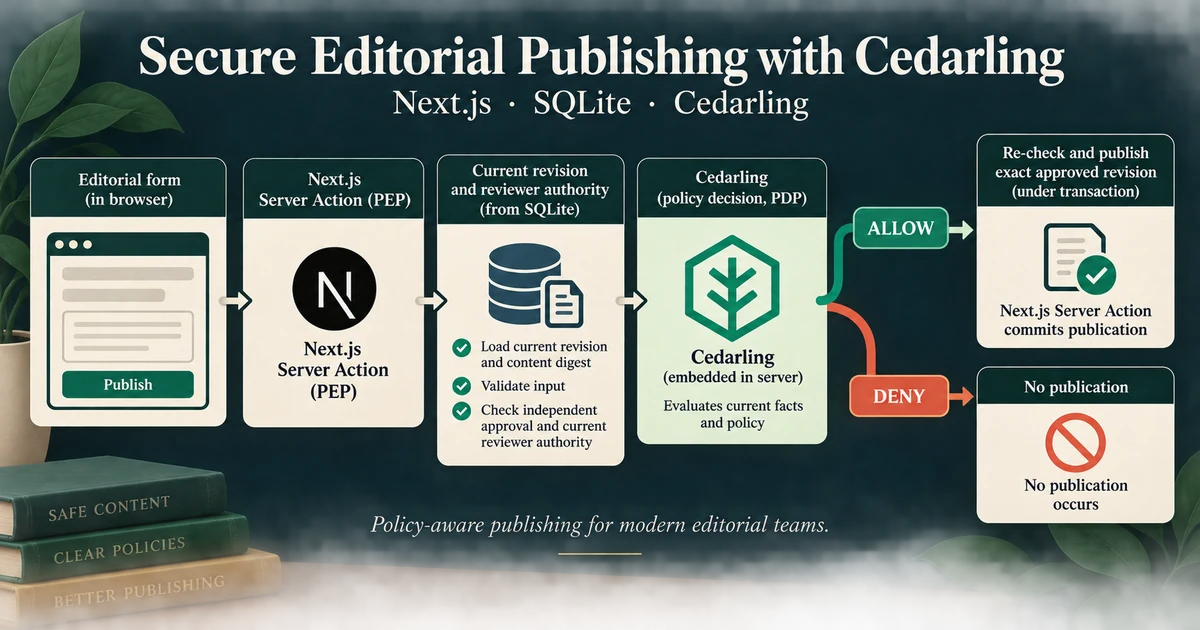
Browser form --> Next.js Server Action (PEP)
                          |
                  authenticate + validate
                          |
                  load current SQLite facts
                  actor / revision / approval / authority
                          |
                  embedded Cedarling PDP <-- policy store
                          |
                DENY or failure --> no mutation
                          |
                        ALLOW
                          v
                  SQLite transaction
                  recheck authorized facts --> commit effect
Cedarling runs on the server using authorizeUnsigned(). “Unsigned” describes
the authorization request, not an unauthenticated user. OIDC authenticates the
session first; the server constructs the principal and facts from trusted state.
The browser receives guidance, not authority over publication.
Observe the unsafe workflow first
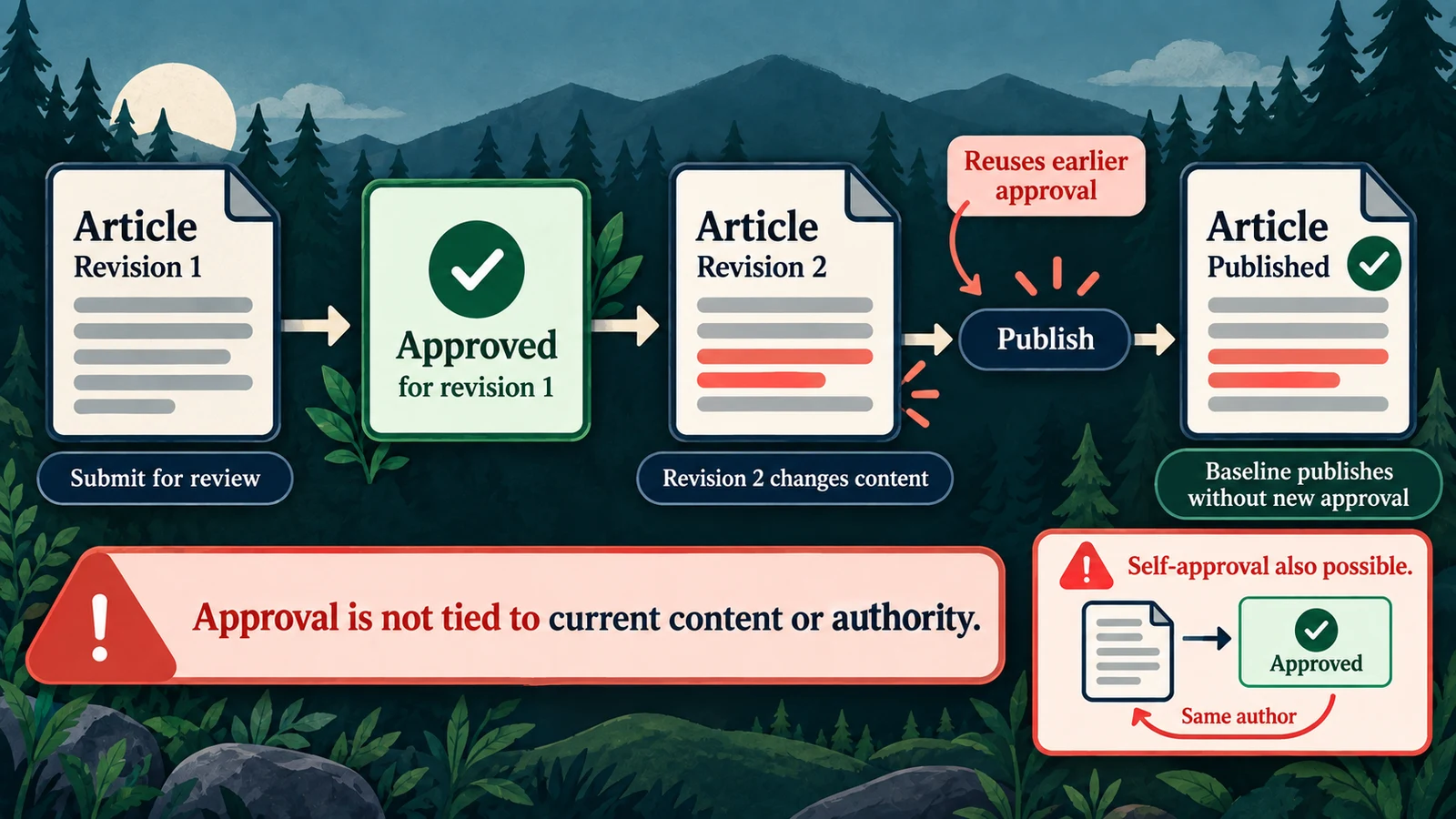
The baseline lacks a decision tied to independent approval of the current revision.
Run the starting application
Start from a separate checkout so the examples and resets affect only tutorial data:
git clone https://github.com/GluuFederation/cedarling-tutorials.git cedarling-p4
cd cedarling-p4
git switch --detach 21b0832be4b31271320df992d04e9d97667d0e38
cd p4-editorial-publishing
docker compose up --build
Open http://localhost:17004. P4's IdP runs at http://localhost:18004.
Select Riley; the development IdP usually prefills riley, so enter it only
if the field is empty. Use a non-empty password such as cedarling-is-awesome on the
development IdP, and approve access.
For native startup instead, use Node.js 24.21 or newer within 24.x and pnpm 10.17.1, then run from the project directory:
pnpm --dir ../shared/identity-provider install --frozen-lockfile
pnpm --dir ../shared/identity-provider build
pnpm install --frozen-lockfile
pnpm run setup
pnpm dev
This starts the IdP and Next.js together. Do not run native and Docker instances on the same ports.
Show self-approval and stale approval
As Riley, open Launch brief, select Submit for review, then Approve revision. The baseline reports that the exact revision was approved, despite Riley being its author without review authority. Authentication and the workflow state check succeeded; the missing condition is independent, authorized review.
Two further exercises show why publication needs its own decision:
- As Ana, approve Customer migration guide revision 1. As Riley, change its body, choose Create new draft, and submit revision 2. As Ana, publish the current revision. The baseline lets an earlier approval cover changed content.
- As Omar, approve Partner announcement. Revoke his authority, then publish as Ana. The baseline still accepts approval from the revoked editor.
For the second exercise, use the command matching your startup method:
# Native
pnpm admin revoke-omar# Docker
docker compose exec cedarpress node --env-file=/run/config/app.env scripts/admin.ts revoke-omarCapture the author/reviewer, revision evidence, and published outcome. The baseline
e2e/editorial-gaps.e2e.ts records these same gaps. Use separate seeded articles
for each exercise. Stop the baseline before integrating, using Ctrl+C and,
for Docker, docker compose down without removing its volume.
Prepare the existing editorial workflow for authorization
No new article feature needs building before Cedarling. The starting application already has the New article form, authenticated Server Actions, revision and approval records, CSRF checks, and database version guards. Its service calls a baseline authorization gateway before each effect, but that gateway still permits publication from the presence of an approval rather than evidence for the current revision:1
// src/server/authorization.ts (starting checkpoint)
case "publication.publish":
  return fact("publisherAuthorityCurrent") && fact("approvalPresent");
Keep the existing workflow and write integrity. Replace this incomplete decision at the service boundary; do not make the button or a historical approval the authority for a new publication.
Model permission for exact content
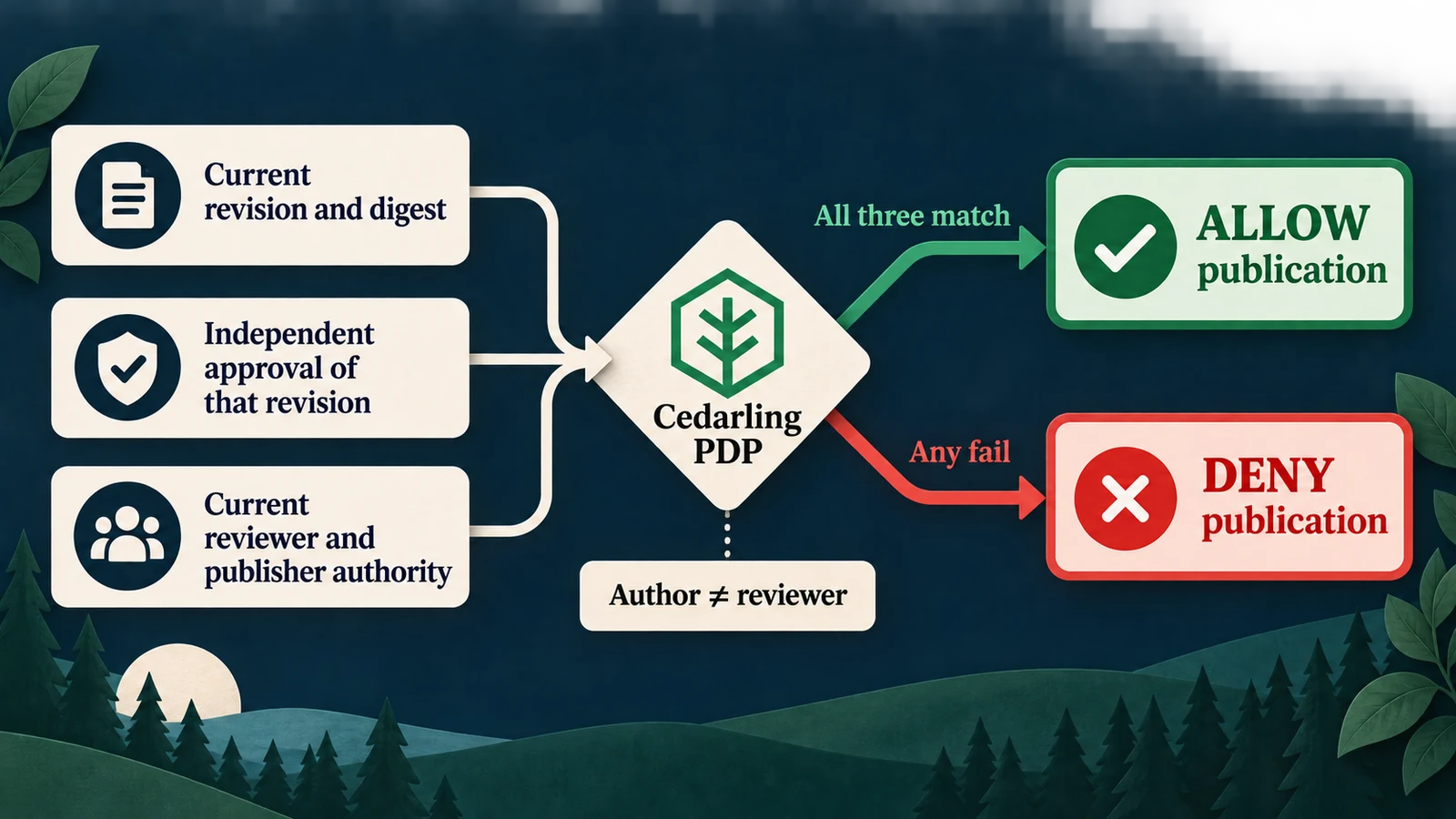
A publish decision needs current content, an independent review, and current authority.
Answer the policy-store questions
Create the readable directory-based store (external site):
policy-store/
  metadata.json
  schema.cedarschema
  policies/
    editorial.cedar
Create these three files from the completed policy store.2
Use the store's metadata and version 1.0.0. Identity comes from the application's
OIDC session, so this policy store needs no trusted-issuer mapping. Principal,
revision, and authority facts arrive with each request; no default entities,
templates, or custom issuers are needed.
| Design question | P4 answer |
|---|---|
| Who acts? | P4EditorialPublishing::Principal: database user ID and tenant |
| Where does a new article belong? | Tenant, selected from the authenticated user |
| What may be read? | An Article in that tenant |
| What does review or publication target? | One Revision, with its ID, tenant, author, version, digest, and state |
| What makes review legitimate? | Current editor authority and a different author |
| What makes publication legitimate? | Current publisher authority plus exact approval evidence from a still-authorized independent reviewer |
| Which facts change per request? | Revision state, approval evidence, and current authority |
| What remains outside policy? | Input bounds, CSRF, state transitions, immutable content, and atomic writes |
The digest3 binds evidence to normalized content. A digest is not permission: it helps compare the content that was reviewed with the content being published. Keep article version and revision version distinct. The former protects the workspace against stale mutations; the latter identifies the approved revision.
Define the request boundaries
All requests use the current server-resolved principal. All action identifiers
have the form P4EditorialPublishing::Action::"CreateArticle".
| Capability | Action | Resource | Additional context | Effect waiting for ALLOW |
|---|---|---|---|---|
article.create |
CreateArticle |
Authenticated tenant | Empty | Insert article and first draft |
article.read |
ReadArticle |
Current article | Empty | Return article and revision evidence |
revision.edit |
EditRevision |
Current revision | Empty | Save owned draft or create next draft |
revision.submit |
SubmitRevision |
Current revision | Empty | Submit owned content for review |
revision.approve |
ApproveRevision |
Exact submitted revision | Current editor authority | Record independent approval |
revision.reject |
RejectRevision |
Exact submitted revision | Current editor authority | Record independent rejection |
publication.publish |
PublishRevision |
Exact current revision | Current publisher authority and approval evidence | Publish that revision |
Creating an article targets the tenant because the article does not yet exist. Its author and tenant are set by the server, not accepted from the form.
Write independent review and exact-publication rules
In policies/editorial.cedar, independent review requires both authority and
separation from the author:
// policy-store/policies/editorial.cedar
@id("independent-review")
permit (
  principal is P4EditorialPublishing::Principal,
  action in [P4EditorialPublishing::Action::"ApproveRevision", P4EditorialPublishing::Action::"RejectRevision"],
  resource is P4EditorialPublishing::Revision
) when {
  principal.tenant_id == resource.tenant_id &&
  context.editor_authority_current &&
  principal.id != resource.author_id &&
  resource.state == "submitted"
};
Publication has a separate permit:
// policy-store/policies/editorial.cedar
@id("publish-exact-approved-revision")
permit (
  principal is P4EditorialPublishing::Principal,
  action == P4EditorialPublishing::Action::"PublishRevision",
  resource is P4EditorialPublishing::Revision
) when {
  principal.tenant_id == resource.tenant_id &&
  context.publisher_authority_current &&
  resource.state == "approved" &&
  context has approval &&
  context.approval.revision_id == resource.revision_id &&
  context.approval.revision_version == resource.version &&
  context.approval.digest == resource.digest &&
  context.approval.reviewer_id != resource.author_id &&
  context.approval.reviewer_authority_current
};
The same file contains read-tenant-article, author-revision, and
create-tenant-article: tenant members read their articles, authors edit/submit
their own revisions, and tenant members create articles in their tenant.
No matching permit means DENY. State and write integrity remain enforced by SQLite
even after an authorization succeeds.
Integrate Cedarling with the server-owned workflow
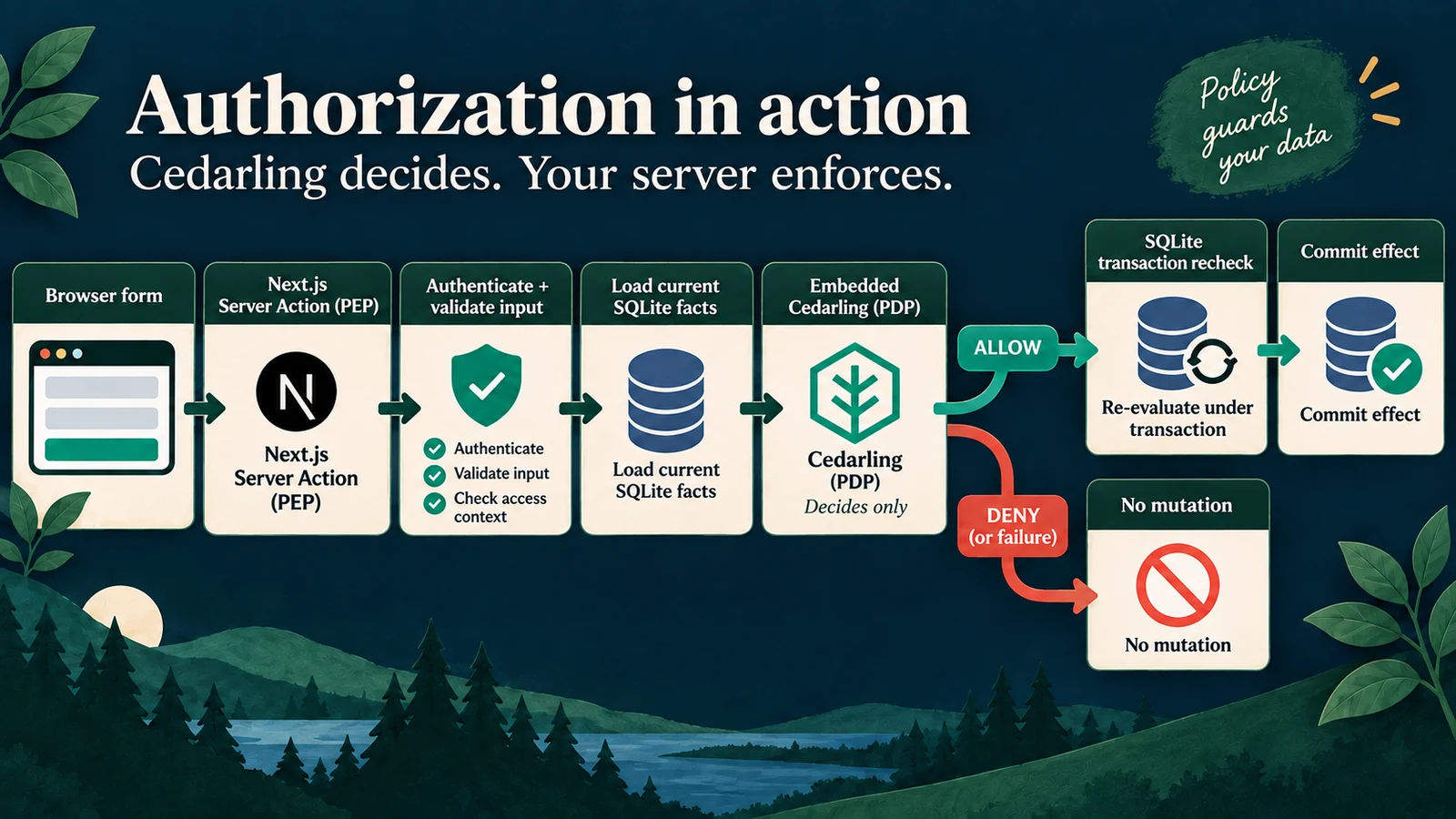
The server checks authorization and rechecks mutable facts before committing a change.
Prepare the archive and initialize the SDK
From P4, install exact versions:
pnpm add --save-exact @janssenproject/cedarling_wasm@0.0.468 fflate@0.8.3
pnpm add --save-dev --save-exact @cedar-policy/cedar-wasm@4.12.0
Add the integration's repository-level shared/policy-store.mjs and
shared/policy-store.d.mts. Run the shared builder to create the archive:
node ../shared/policy-store.mjsIt validates source and produces ignored .local/policy-store.cjar. Use the same
artifact preparation in Docker; keep the source directory readable in Git.
Replace the permissive implementation in src/server/authorization.ts with
direct SDK calls (external site).
Initialize once through the existing server runtime. This excerpt assumes
archivePath is the server-resolved path to the generated archive:
// src/server/authorization.ts
import { readFile } from "node:fs/promises";
import { initFromArchiveBytes } from "@janssenproject/cedarling_wasm";

const archive = new Uint8Array(await readFile(archivePath));
const cedarling = await initFromArchiveBytes(
  {
    CEDARLING_APPLICATION_NAME: "P4 Editorial Publishing",
    CEDARLING_LOG_TYPE: "memory",
    CEDARLING_LOG_TTL: 300,
    CEDARLING_STRICT_SCHEMA_VALIDATION: "enabled",
  },
  archive,
);
Log the store version and SHA-256 at initialization. The module exposes
close: () => cedarling.shutDown() for controlled lifecycle owners such as tests.
Construct the publication request from current records
src/server/service.ts parses form candidates, loads the current article and
revision, loads the latest approval, and loads the publisher's current authority.
The authorization module maps those trusted records into Cedarling's request.
The following expanded publication request illustrates what that function
constructs from principal, article, approval, and
publisherAuthorityCurrent; the completed source uses a shared capability
mapping and a bounded failure handler:
// src/server/authorization.ts
const result = await cedarling.authorizeUnsigned(
  JSON.stringify({
    principal: {
      cedar_entity_mapping: {
        entity_type: "P4EditorialPublishing::Principal",
        id: principal.id,
      },
      id: principal.id,
      tenant_id: principal.tenantId,
    },
    action: 'P4EditorialPublishing::Action::"PublishRevision"',
    resource: {
      cedar_entity_mapping: {
        entity_type: "P4EditorialPublishing::Revision",
        id: article.revision.id,
      },
      revision_id: article.revision.id,
      tenant_id: article.tenantId,
      author_id: article.revision.authorId,
      version: article.revision.version,
      digest: article.revision.digest,
      state: article.revision.state,
    },
    context: {
      publisher_authority_current: publisherAuthorityCurrent,
      ...(approval
        ? {
            approval: {
              revision_id: approval.revisionId,
              revision_version: approval.revisionVersion,
              digest: approval.digest,
              reviewer_id: approval.reviewerId,
              reviewer_authority_current: approval.authorityCurrent,
            },
          }
        : {}),
    },
  }),
);
for (const log of cedarling.getLogsByRequestId(result.request_id)) {
  console.info(JSON.stringify(log, null, 2));
}
if (result.response.diagnostics.errors.length > 0) throw unavailable();
return result.decision === true;
authorizeUnsigned() expects a JSON string; JSON.stringify() serializes the
current principal, resource, and context for that Cedarling call.4 The
formatted log call makes nested reasons readable in this local exercise.
unavailable() is the existing application error from src/server/errors.ts.
The surrounding catch maps SDK failures to that bounded error without printing
raw request data. False becomes FORBIDDEN in the service. Neither path writes.
For other capabilities, map the corresponding resource and context from the request table. Use current database authority, never a form field claiming that an editor or approval is still valid.
Keep ALLOW tied to the committed effect
In the publication service, the protected sequence is:
// src/server/service.ts
const approval = this.database.latestApproval(articleId);
const publisher = this.database.authority(
  session.principal.id,
  article.tenantId,
  "publisher",
);
await this.allow({
  requestId,
  capability: "publication.publish",
  principal: session.principal,
  article,
  publisherAuthorityCurrent: publisher.current,
  approval,
});
this.database.publish(
  articleId,
  article.tenantId,
  session.principal.id,
  version,
  { publisher, approval },
);
Here article was already resolved at the submitted expected article version.
Inside the write transaction, recheck the article and authority/approval snapshots.
If content or authority changed while awaiting Cedarling, reject with
STATE_CONFLICT. Do not turn an ALLOW for earlier facts into permission for a
new state. Apply the same principle to draft, submit, and review operations.
Keep authentication, same-origin and CSRF verification inside the Server Action
path in app/actions.ts. "use server" is not an access-control rule: these
functions are reachable by network requests.
Apply the same pattern to creation: the New article form at
app/articles/new/ calls createArticle and EditorialService.create().
Enforce CreateArticle against the session tenant before saving the article
and first draft. The author and tenant come from the authenticated session.
Page rendering requests permission previews for controls. Keep denied controls disabled with a short explanation; do not duplicate policy as client role checks. Every actual action reloads facts and authorizes again. OAuth tokens and raw policy diagnostics stay on the server. Successful forms show readable outcomes, not internal request IDs.5
Finish the runnable editorial application
Make the same archive available to development, production builds, and Docker.
scripts/setup.ts builds it; the build script runs the shared builder before
Next.js compilation. Docker includes the archive in the completed application
image.6
{
  "scripts": {
    "build": "node ../shared/policy-store.mjs && next build"
  }
}
The server runtime also needs serverExternalPackages for
@janssenproject/cedarling_wasm in next.config.ts; this is packaging for the
server-only WASM dependency, not a browser PDP.7 The existing New article
path remains one of the seven capabilities to enforce, not a separate feature
to recreate.
Prove that approval is evidence, not permanent permission
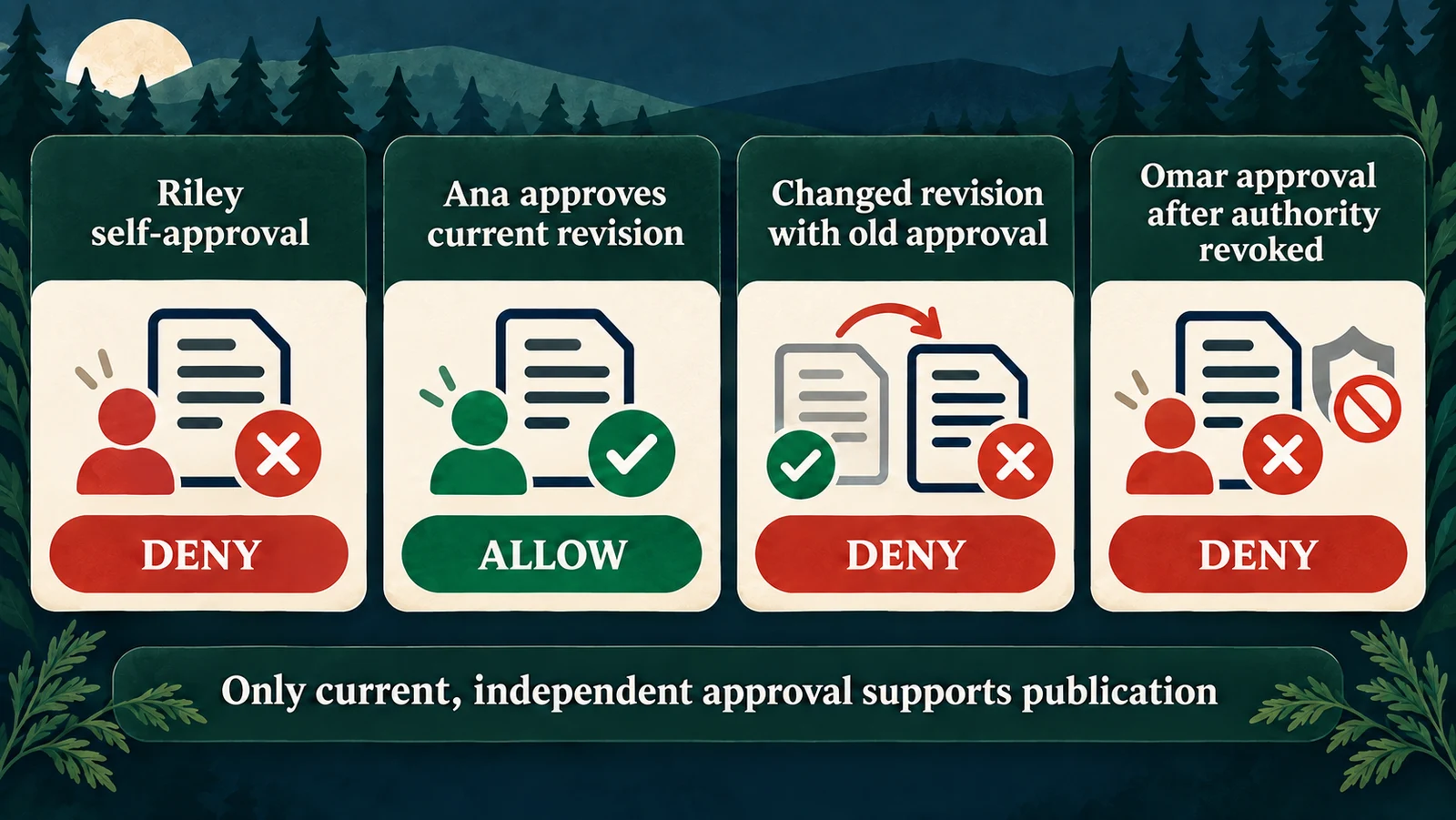
The same article can become ineligible to publish when its revision or reviewer authority changes.
Repeat the original attempt by bypassing the button
Use a fresh article for this exercise. As Riley, create an article, submit its draft for review, and confirm that its current revision says submitted. The Approve revision button is disabled. To prove the server boundary, open developer tools on that article's local page and run:
const button = [...document.querySelectorAll('button[type="submit"]')].find(
  (element) => element.textContent?.trim() === "Approve revision",
);
if (!button) throw new Error("Submit this article's current draft first");
button.removeAttribute("disabled");
button.click();
Expect “This action is not allowed.” Reload: the revision remains submitted and no approval was recorded. This modifies only the local control and submits the real framework form; it does not grant authority.
For a direct HTTP proof, capture that actual Server Action POST in the Network
panel and replay it using the same authenticated local session. Preserve its
current action header, body, and CSRF value. Do not invent or hard-code a Next.js
action ID, and do not publish the captured credentials. The automated browser
check performs this replay. The transport can return HTTP 200 with an
x-action-redirect containing error-forbidden; judge the application outcome
and unchanged record, not the transport status alone.
Complete legitimate work, then invalidate its evidence
| Exercise | Expected integrated outcome |
|---|---|
| Riley creates a new article and submits it | ALLOW; author and tenant are server-assigned |
| Riley approves or rejects their own revision | DENY; no review evidence created |
| Ana approves Riley's exact submitted revision, then publishes it | ALLOW; one publication effect |
| Riley submits a new revision after an earlier approval | Publication denied until that new revision receives approval |
| Omar approves, then loses editor authority | Ana cannot publish using that approval |
| Content or authority changes while a decision is pending | Conflict; no stale authorized write |
Use Customer migration guide for the new-revision scenario and Partner announcement for revocation, following the same steps as before integration. Use Editorial handbook as Ana's valid approval/publication control, or finish the article Riley created during this exercise.
For reproducible fresh data, use pnpm reset in native mode or
docker compose exec cedarpress node --env-file=/run/config/app.env scripts/reset.ts
in Docker. Reset deliberately clears editorial records, sessions, and pending
sign-ins in this exercise database; sign in again afterward.
Read decisions separately from completed actions
authorization.context links the application requestId, actor, capability,
and preview or enforcement phase to a native cedarlingRequestId. Native JSON
prints all policy reasons and errors. An allowed publication cites
publish-exact-approved-revision.
A self-approval DENY can have empty diagnostics.reason and errors: no permit
matched, rather than the engine malfunctioning. Explain it using the trusted
author and editor facts. A preview ALLOW may be followed by enforcement DENY
after revocation; the preview was guidance for an earlier state.
editorial.action.completed appears after the effect commits.
editorial.action.failed identifies a controlled failure. Pair these with the
revision evidence and logs; an ALLOW alone does not establish publication.
Memory logs expire after five minutes and are not a durable audit store.
Check stale state and failures
Stop the learner app to free ports 17004 and 18004 before running:
pnpm exec playwright install chromium
pnpm check
On Linux, use pnpm exec playwright install --with-deps chromium if browser
libraries are missing. The check includes formatting, lint, types, tests, and
a production build/browser workflow with disposable data.
test/authorization.test.ts evaluates the real policies. test/service.test.ts
checks self-review, changed revisions, revoked authority, and unavailable
Cedarling without effects. It also introduces concurrent changes while decisions
are pending. e2e/editorial-authorization.e2e.ts uses the real IdP and browser,
including button tampering and direct Server Action replay.
Record one failed self-approval before and after integration, and one legitimate publication showing the exact approved revision. Keep tokens, cookies, and CSRF values out of recordings.
Apply the pattern to other approval workflows
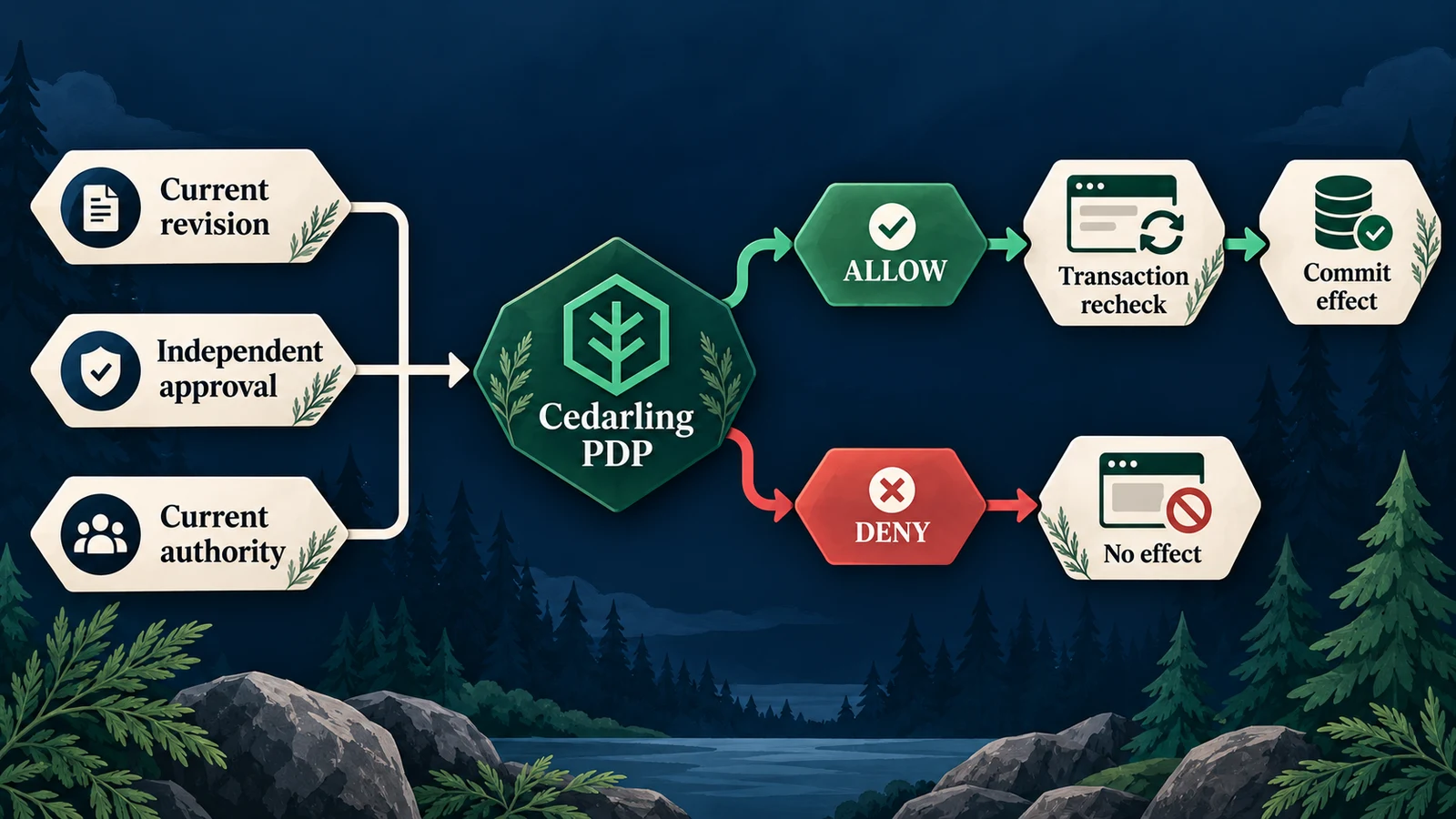
Bind approval to the exact content being published, then enforce the current decision.
Treat approval as evidence about a specific resource version. Before the next protected effect, check both that evidence and the authority that still exists. Then commit only if the facts authorized by Cedarling remain current.
Follow src/server/authorization.ts, src/server/service.ts,
src/server/database.ts, app/actions.ts, policy-store/, and the tests in the
completed P4 project (external site).
Production needs a real identity provider, governed authority changes, secure transport, protected sessions, and durable audit retention. Policy decisions do not replace transaction integrity or the workflow's content-version rules.
For a production stack, consider Agama Lab Policy Designer for policy authoring, Jans Auth for token issuance, and Lock Server for centralized decision logs. See Cedarling production solutions.
Next, P5 applies current-fact authorization to a different form of disclosure: fields, aggregates, and CSV exports that must not inherit broad page access.
Footnotes
-
Starting-checkpoint source:
src/server/authorization.ts(external site) defines the baseline gateway;src/server/service.ts(external site) calls it before service effects. ↩ -
Complete tagged store:
metadata.json(external site),schema.cedarschema(external site), andeditorial.cedar(external site). ↩ -
A digest is a reproducible fingerprint of the normalized revision content. P4 compares it with the approval's digest, while current reviewer authority and revision state remain separate requirements. ↩
-
The pinned
cedarling_wasmJavaScript API (external site) accepts a JSON-string request. Serialization does not authenticate the values; P4 loads them from its trusted server state. ↩ -
Complete enforcement source:
src/server/authorization.ts(external site),src/server/service.ts(external site),src/server/database.ts(external site), andapp/actions.ts(external site). ↩ -
Archive build and distribution:
shared/policy-store.mjs(external site),scripts/setup.ts(external site),package.json(external site), andDockerfile(external site). ↩ -
Completed
next.config.ts(external site) keeps the Cedarling WASM package server-side. ↩