




Protect Sensitive Data Exports with Cedarling
Authorize fields, tenant-bound queries, aggregate disclosure, and CSV export access at their server boundaries.
On this page
Project source and prerequisites
- Complete P5 project (external site) and starting checkpoint (external site).
- Install Docker with Compose, or Node.js 24.21+ within 24.x and pnpm 10.17.1. The project supplies its own tutorial identity provider.
- Local HTTP and the bundled IdP are for learning only. Production requires HTTPS and a configured OIDC/OAuth issuer, such as Jans Auth (external site), Gluu, Auth0, or Okta.
- I prepared these steps on Ubuntu 24.04+. Native project checks also run in CI on macOS and Windows. If a platform-specific step fails, open an issue (external site).
- New to Cedarling? Read the short introduction when you need it.
- Keep the official Cedar policy syntax (external site) and Cedar schema syntax (external site) references handy for the policy-store steps.
Paths are relative to p5-dataguard/ unless stated otherwise. Use fresh
synthetic fixtures for the examples; a changed query or export state can change
later results.
Does permission to open a dashboard include every field?
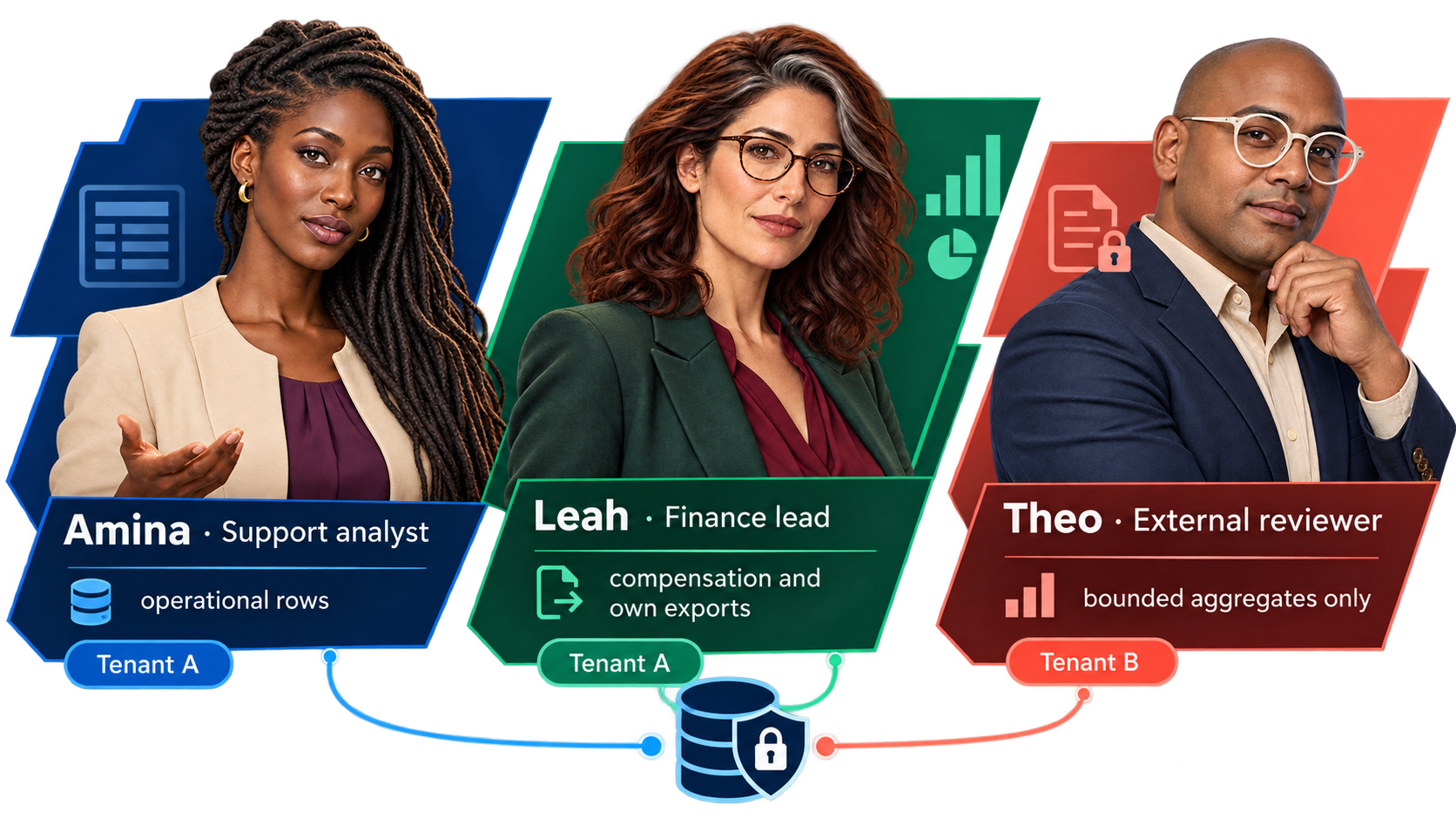
Amina, Leah, and Theo have different authorized views of the same dataset.
A support analyst needs operational records. A finance lead needs compensation. An external reviewer needs aggregate evidence1, not employee-level records. Giving all three access to one page does not make the underlying data equally available to them.
I'll start with a direct request that bypasses the field picker, then show how the server can authorize each kind of data release.
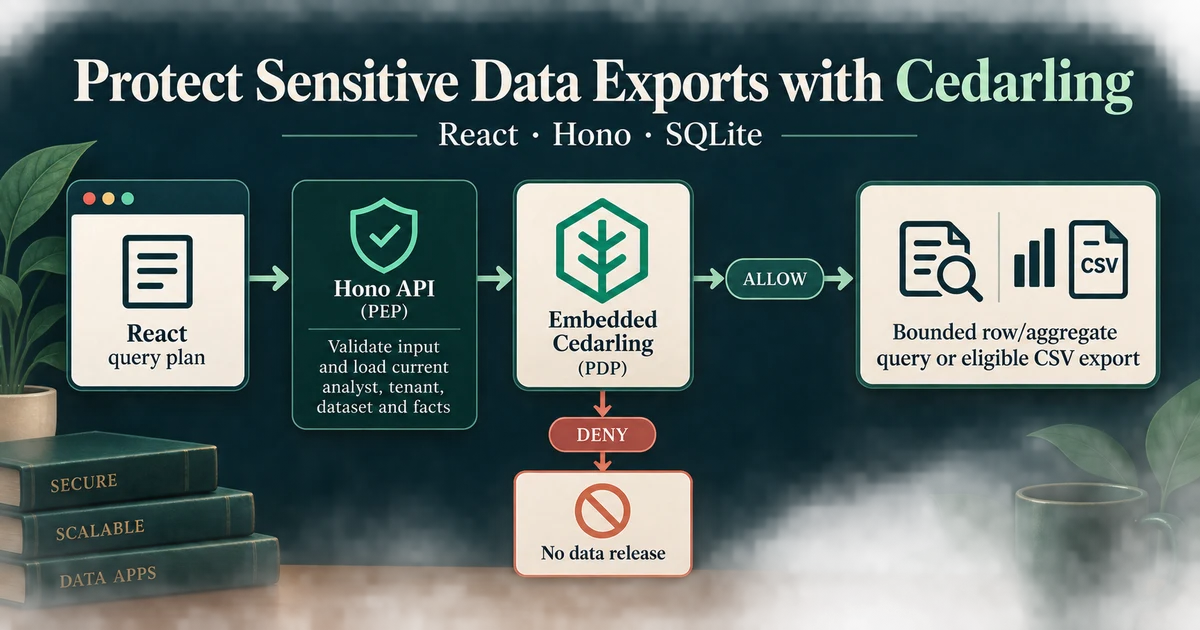
P5 is a React application with a Hono Node.js API and SQLite. The browser submits a bounded query plan, not SQL. We will use Cedarling to protect field metadata, row queries, aggregates, and the full CSV export lifecycle.
- Amina, Tenant A support analyst: operational fields and tenant ID for
support; no personal or compensation fields and no exports. - Leah, Tenant A finance lead: all fields for
finance-review, including salary and bonus; creates and manages her own exports. - Theo, Tenant B external reviewer: permitted count aggregates for
external-audit; no rows, employee IDs, personal/compensation fields, or exports.
An aggregate must also contain at least five records in every released group. A valid purpose and role do not override that disclosure constraint.
React query plan --> Node.js API (PEP)
                           |
                  authenticate + validate plan
                           |
               current analyst + field catalog
               aggregate counts, when needed
                           |
                    Cedarling PDP <-- policy store
                           |
             DENY / failure --> no result or export
                           |
                         ALLOW
                           v
                 transaction: recheck facts
                           |
                parameterized query --> rows / aggregate / CSV

Download or revoke --> reload saved export --> new decision --> effect
Cedarling runs only on the server. It receives a trusted application principal
through authorizeUnsigned(). OIDC has already authenticated that principal;
“unsigned” does not mean the browser may invent its role or tenant.
Reproduce a sensitive-field disclosure
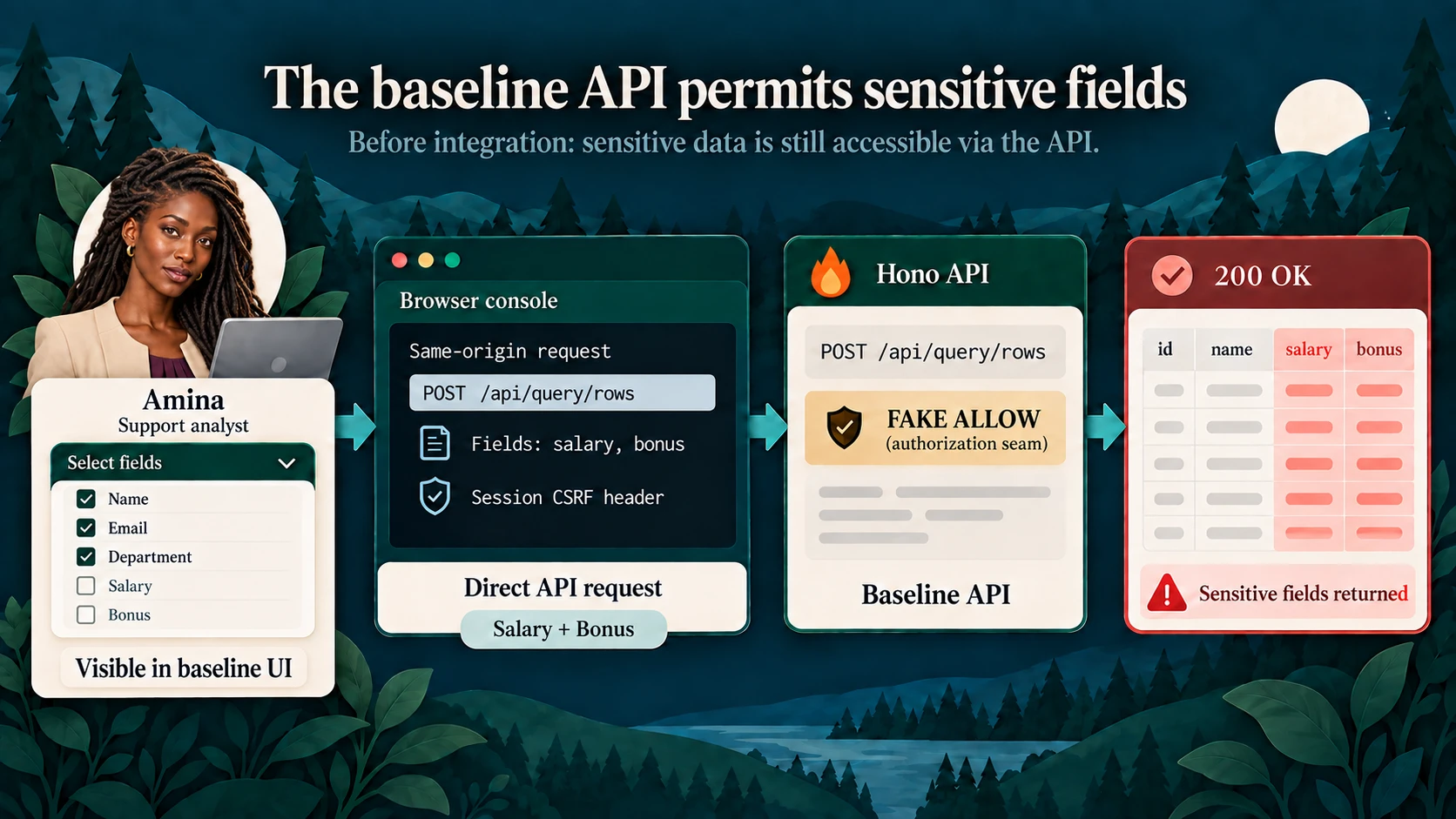
The baseline field picker exposes Salary and Bonus; a direct API request tests the same server boundary independently of that UI.
Start a separate baseline
Use disposable tutorial data in a new checkout:
git clone https://github.com/GluuFederation/cedarling-tutorials.git cedarling-p5
cd cedarling-p5
git switch --detach 21b0832be4b31271320df992d04e9d97667d0e38
cd p5-dataguard
docker compose up --build
Open http://localhost:17005. The development IdP is at
http://localhost:18005. Select Amina. The development IdP usually prefills
amina; enter it if the field is empty. Use a non-empty password such as
cedarling-is-awesome, and approve access.
For native development instead, use Node.js 24.21 or newer within 24.x and pnpm 10.17.1. From the project directory:
pnpm --dir ../shared/identity-provider install --frozen-lockfile
pnpm --dir ../shared/identity-provider build
pnpm install --frozen-lockfile
pnpm dev
Use only one startup method on these ports.
Request salary without using the field picker
On the authenticated application page, open developer tools and run:
const session = await fetch("/api/session").then((response) => response.json());
const response = await fetch("/api/query/rows", {
  method: "POST",
  headers: {
    "content-type": "application/json",
    "x-csrf-token": session.csrfToken,
  },
  body: JSON.stringify({
    kind: "rows",
    fields: ["employeeId", "salary", "bonus"],
    filter: { field: "tenantId", operator: "eq", value: "tenant-a" },
    purpose: "support",
    limit: 10,
  }),
});
console.log(response.status, await response.json());
The baseline returns 200 with compensation columns. This is Amina's real session and a valid same-origin request. SQL parameterization prevents values from becoming SQL instructions, but does not decide whether Amina may see salary.
The same baseline also permits cross-tenant queries, small-group aggregates,
and another user's export access. Its e2e/sensitive-data-gaps.e2e.ts exercises
those gaps. Keep this exact compensation request for the final comparison rather
than relying only on a hidden checkbox.
Capture the response using synthetic data only. Stop the baseline before
integrating; for Docker use Ctrl+C, then docker compose down without deleting
the volume.
Prepare the existing data workflow for authorization
No separate dashboard or export feature needs adding before Cedarling. The
starting application already authenticates requests, checks CSRF, validates a
bounded query grammar, uses parameterized SQL, and stores exports with expiry
and revocation. Its evaluatePlan() compiles and executes the query before a
permissive trace; that trace is not a permission decision:2
// src/server/app.ts (starting checkpoint)
const evaluation = database.evaluate(compiled, compileCardinalityQuery(plan));
Keep the input and SQL safeguards. The integration must move the authorization gate before protected row or aggregate values are read or released. Only a bounded group-cardinality probe may precede ALLOW, to supply trusted facts for the aggregate decision. Do not add a browser role table in place of that server boundary.
Design permission for the requested data and its derivatives
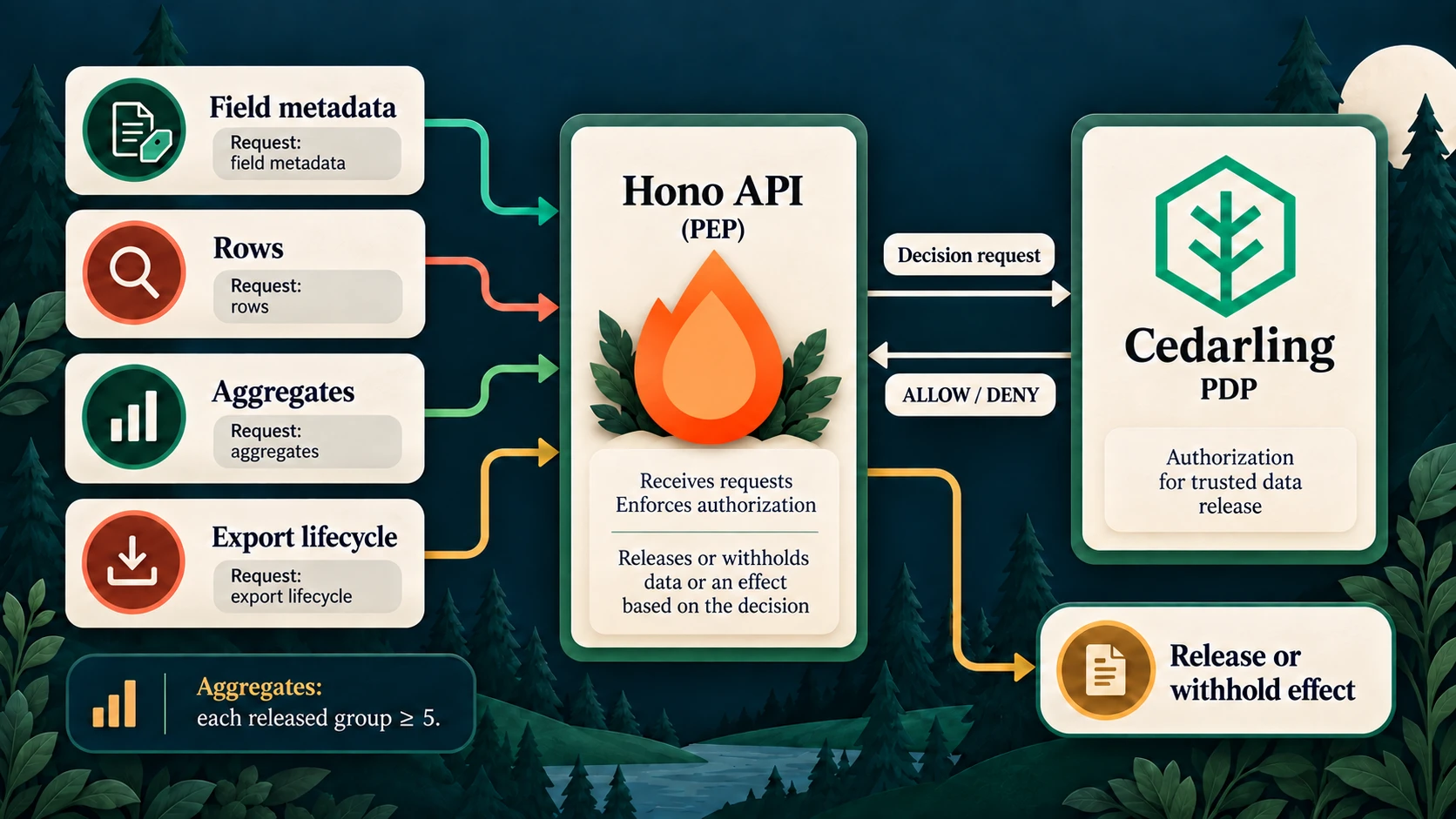
Each response surface gets its own authorization decision before disclosure.
Translate responsibilities into a policy store
Use the directory-based policy-store format (external site):
policy-store/
  metadata.json
  schema.cedarschema
  policies/
    fields.cedar
    plans.cedar
    exports.cedar
Create these five files from the completed policy store.3
Use the store's metadata and version 1.0.0. Namespace P5DataGuard contains
four entity types: Analyst, Dataset, Field, and Export. OIDC and SQLite
supply identity and current facts, so this store needs no trusted issuers,
default entities, templates, or custom issuers.
| Design question | P5 answer |
|---|---|
| Who acts? | Analyst: current database ID, tenant, and role |
| Which fields may be discovered? | A Field with its server-owned name and classification |
| What do plans target? | Dataset::"workforce" |
| What does a saved download or revocation target? | Export with current owner, tenant, and purpose |
| What does the request ask for? | Plan kind, purpose, tenant constraint, fields, and classifications |
| Which additional fact protects aggregates? | Current minimum count among released groups |
| What protects saved artifacts? | Current finance authority, same tenant, ownership, plus application-enforced expiry and state |
Field classifications come from the closed server catalog, not from the browser. Include fields used for filters and grouping as well as returned columns. A hidden field can still leak information through a predicate or a group key.
The plan must explicitly contain tenantId eq <current tenant>. The server does
not silently add or repair that filter. A different field, operator, or omitted
filter does not establish the required tenant constraint.
Identify every enforcement boundary
All requests use the current database analyst as principal. Actions below use
the P5DataGuard::Action namespace.
| Capability | Action | Resource | Context | Effect waiting for ALLOW |
|---|---|---|---|---|
dataset.inspect |
InspectDataset |
Each candidate field | Empty | Return field metadata to React |
data.query |
Query |
Workforce dataset | Validated row-plan facts | Return bounded rows |
data.aggregate |
Aggregate |
Workforce dataset | Plan facts and current minimum group size | Return aggregate values |
data.export |
CreateExport |
Workforce dataset | Saved candidate plan facts; group size for aggregates | Materialize bounded CSV |
export.download |
DownloadExport |
Current saved export | Empty | Prepare CSV response |
export.revoke |
RevokeExport |
Current saved export | Empty | Commit revocation and clean up its file |
Before an aggregate decision, the server obtains bounded group counts from SQLite. That probe returns cardinalities to the application, not protected group values. Protected result values wait for ALLOW. This is a deliberate source of trusted policy facts, not a query-then-redact design.
Share the plan rule across query and export
The complete rule in policies/plans.cedar prevents export from bypassing the
query's tenant, field, purpose, or group-size restrictions:
// policy-store/policies/plans.cedar
@id("authorized-plan")
permit (
  principal is P5DataGuard::Analyst,
  action in [P5DataGuard::Action::"Query", P5DataGuard::Action::"Aggregate", P5DataGuard::Action::"CreateExport"],
  resource == P5DataGuard::Dataset::"workforce"
)
when {
  context has tenant_id && context.tenant_id == principal.tenant_id &&
  ((action == P5DataGuard::Action::"Query" && context.kind == "rows") ||
   (action == P5DataGuard::Action::"Aggregate" && context.kind == "aggregate") ||
   (action == P5DataGuard::Action::"CreateExport" && ["rows", "aggregate"].contains(context.kind))) &&
  (context.kind == "rows" ||
    (context has minimum_group_size && context.minimum_group_size >= 5)) &&
  (
    (principal.role == "Finance lead" && context.purpose == "finance-review") ||
    (principal.role == "Support analyst" && context.purpose == "support" &&
      action != P5DataGuard::Action::"CreateExport" &&
      ["operational", "tenant"].containsAll(context.classifications)) ||
    (principal.role == "External reviewer" && context.purpose == "external-audit" &&
      action == P5DataGuard::Action::"Aggregate" &&
      ["operational", "tenant"].containsAll(context.classifications) &&
      !context.field_names.contains("employeeId"))
  )
};
The separate inspect-fields policy limits field metadata by the same role and
classification boundaries. Inspection is guidance, not permission for later
queries. Every submitted plan is still checked independently.
For saved artifacts, policies/exports.cedar requires ownership and current
finance authority:
// policy-store/policies/exports.cedar
@id("manage-own-finance-export")
permit (
  principal is P5DataGuard::Analyst,
  action in [P5DataGuard::Action::"DownloadExport", P5DataGuard::Action::"RevokeExport"],
  resource is P5DataGuard::Export
)
when {
  principal.role == "Finance lead" &&
  resource.owner_id == principal.id &&
  resource.tenant_id == principal.tenant_id &&
  resource.purpose == "finance-review"
};
An opaque reference locates an export; it is not permission to download it. Expiry, reference validation, file integrity, and lifecycle state remain application checks. No matching permit gives DENY.
Integrate Cedarling before data leaves the server
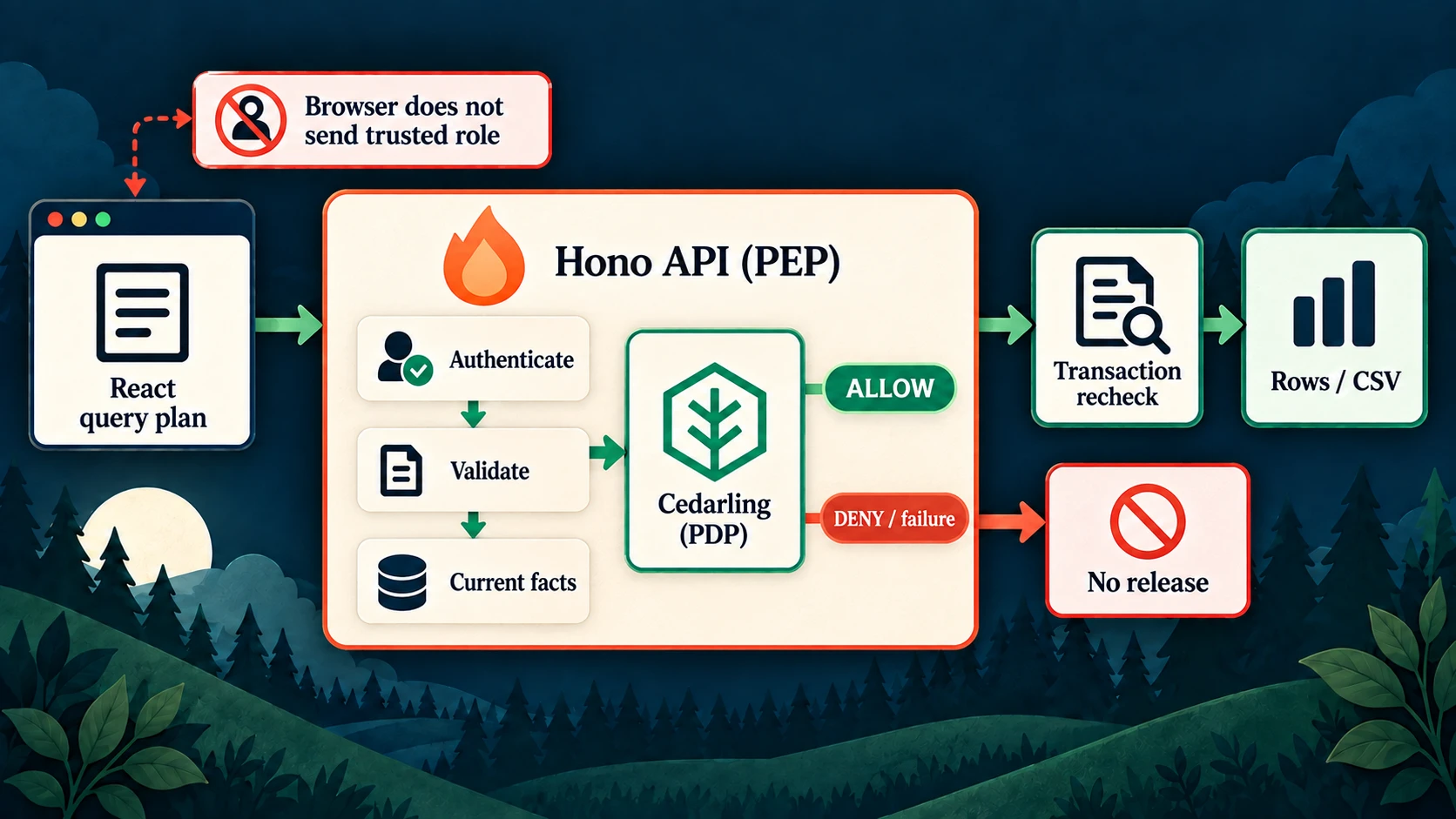
The API enforces the decision; browser controls are guidance, not authority.
Initialize the embedded runtime
Install pinned dependencies from P5:
pnpm add --save-exact @janssenproject/cedarling_wasm@0.0.468 fflate@0.8.3
pnpm add --save-dev --save-exact @cedar-policy/cedar-wasm@4.12.0
Add the integration's repository-level shared/policy-store.mjs and declaration,
which are absent from the starting commit. Run the builder to create the archive:
node ../shared/policy-store.mjsKeep readable policy source in Git and ignored .local/policy-store.cjar as the
runtime artifact. In src/server/authorization.ts, initialize one instance using
the pinned SDK (external site):
// src/server/authorization.ts
import { readFile } from "node:fs/promises";
import { initFromArchiveBytes } from "@janssenproject/cedarling_wasm";

const archive = new Uint8Array(await readFile(archivePath));
const cedarling = await initFromArchiveBytes(
  {
    CEDARLING_APPLICATION_NAME: "P5 DataGuard",
    CEDARLING_LOG_TYPE: "memory",
    CEDARLING_LOG_TTL: 300,
    CEDARLING_STRICT_SCHEMA_VALIDATION: "enabled",
  },
  archive,
);
archivePath resolves to this project's .local/policy-store.cjar by default;
it is a server-side artifact, not a browser path. Log its version and SHA-256. Have
src/server/main.ts create the authorization dependency, pass it to buildApp(),
and close Cedarling through shutDown() during controlled application shutdown.
Replace the permissive trace path rather than retaining an alternative unguarded
execution path.
Build requests from the exact validated plan
The server validates the closed plan grammar before authorization. Its field-name
set includes selected columns or aggregate operands/grouping, plus any filter
field. From the server catalog, derive the set of classifications. Include
tenant_id only when the submitted filter is an exact tenant equality.
The following expanded request illustrates the direct Cedarling call inside
the authorization function. analyst comes from the current database session;
action is the mapped action; resource and context are constructed from the
request table. The completed file factors out principal(analyst) and logs
through logDecision():
// src/server/authorization.ts
const result = await cedarling.authorizeUnsigned(
  JSON.stringify({
    principal: {
      cedar_entity_mapping: {
        entity_type: "P5DataGuard::Analyst",
        id: analyst.id,
      },
      id: analyst.id,
      tenant_id: analyst.tenantId,
      role: analyst.role,
    },
    action,
    resource,
    context,
  }),
);
for (const log of cedarling.getLogsByRequestId(result.request_id)) {
  console.info(JSON.stringify(log, null, 2));
}
if (result.response.diagnostics.errors.length > 0) {
  throw new AuthorizationError(503, "authorization_unavailable");
}
return result.decision === true;
authorizeUnsigned() expects a JSON string, so JSON.stringify() serializes
the server-validated decision request for Cedarling.4 The log formatting
call prints nested reasons for this local exercise.
Add the integration's AuthorizationError type in src/server/errors.ts. The surrounding
catch maps Cedarling failure to the same bounded unavailable outcome. A valid false
decision instead becomes 403 authorization_denied at the protected route.
For Amina's compensation request, the resource is Dataset::"workforce" and the
constructed context has this shape:
{
  "kind": "rows",
  "purpose": "support",
  "tenant_id": "tenant-a",
  "field_names": ["employeeId", "salary", "bonus", "tenantId"],
  "classifications": ["operational", "compensation", "tenant"]
}
Set order is not significant. Compensation prevents the support permit from
matching. For an aggregate, add server-computed minimum_group_size; do not
accept a count asserted by the browser.
For dataset inspection, call authorizeUnsignedBatch() with this principal and
one InspectDataset item per catalog field. Require complete results, check
item.is_ok, unwrap valid results, reject diagnostics errors, and return only
allowed metadata. Log allowed and denied items; a batch failure must not expose
unchecked fields.
Gate execution and recheck current facts
In src/server/app.ts, the common executePlan() path validates current facts,
asks Cedarling, then enters the transaction that executes the query or creates
an export. Within that transaction, recheck the session's analyst/entitlements
and the aggregate cardinality used by the decision. A change produces
409 authorization_state_changed, not reuse of an earlier ALLOW.
Compile and execute protected-value SQL only after authorization. Keep fixed SQL
identifiers and bound values in src/server/query.ts. SQL safety and access
control solve different problems.
Download and revoke routes reload the saved export and authorize it separately. Check ownership using the saved owner, never a request field. Verify expiry, state, and current facts again before the effect. Revocation remains committed even if subsequent CSV cleanup fails; failed cleanup must not restore access.
Make controls reflect the server's decision
POST /api/authorization previews the exact selected plan and export operations.
It returns action availability, not rows or a CSV. React discards obsolete preview
responses and disables controls while checking or when decisions are unavailable.
Each actual query/export request still authorizes again.
Bind export controls to the last completed query, not the next edited form. Editing a draft query does not silently replace the result being exported. Do not add a second role-permission table or a browser Cedarling instance.
For native use of the completed project, install/build the shared IdP and install
P5 dependencies. The server's query, export, and preview gates are connected in
src/server/app.ts; each still reloads current facts before an effect.5
Finish the runnable data-guard application
Make archive creation part of setup and the production build. The
existing development supervisor already runs setup and build before starting
the IdP and API, so pnpm dev now receives the archive through those steps;
there is no new development launcher to add.6
{
  "scripts": {
    "build": "node ../shared/policy-store.mjs && vite build && tsc -p tsconfig.server.json"
  }
}
Copy the generated .local/policy-store.cjar into the Docker runtime image.7
For compiled native startup, run pnpm run setup and pnpm build, keep
node --env-file=.local/idp/.env ../shared/identity-provider/dist/main.js
running in another terminal, and run pnpm start. Docker remains
docker compose up --build.
Prove both restricted and useful access
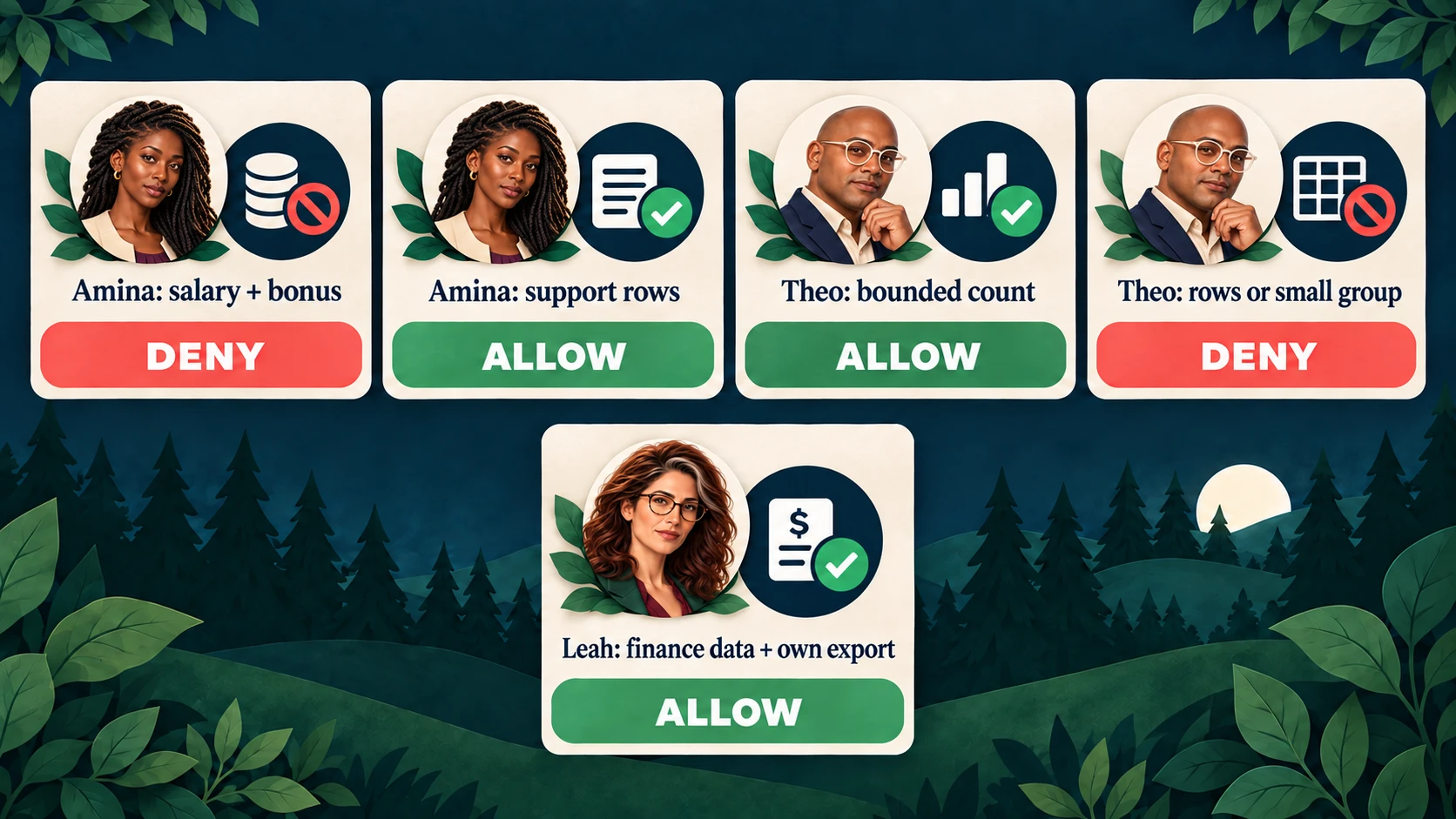
The allowed response depends on the requested fields, result type, and caller.
Repeat the exact direct request
As Amina, repeat the compensation request from the baseline section. Expect
403 with error: "authorization_denied" and a request ID, without result
rows. Salary and bonus are also absent from her field picker, but the direct API
request proves that hiding controls is not the security boundary.
Change the fields to employeeId, department, and tenantId, retaining the
Tenant A filter and support purpose. This is legitimate operational work and
returns 200. Changing the tenant to tenant-b or removing the tenant filter
must deny again.
Exercise aggregates and finance exports
Use fresh fixtures and select the purpose matching each account:
| Account and plan | Expected result |
|---|---|
| Amina: Tenant A support rows with operational fields | ALLOW |
| Amina: Count, No grouping, Tenant A, support | Count 10; no export |
| Theo: Rows, Tenant B, external-audit | DENY |
| Theo: Count, No grouping, Tenant B, external-audit | Count 8 |
| Theo: Count grouped by Department, default limit | DENY: at least one released group has fewer than five records |
| Theo: Same Department grouping with Limit 1 | Finance group count 5; ALLOW |
| Leah: Tenant A rows including Salary and Bonus, finance-review | ALLOW; export permitted |
| Leah: No grouping, Average Salary / Average Bonus | 5,270,000 / 338,250 |
| Leah: Department-grouped aggregates releasing small groups | DENY, including export |
The grouping/limit example applies to the deterministic fixture ordering. It teaches a rule over released groups, not a general defense against statistical inference.
To exercise a direct aggregate request, use the authenticated browser session's
CSRF header as in the first example and POST this body to
http://localhost:17005/api/query/aggregate as Theo:
{
  "kind": "aggregate",
  "operation": "count",
  "filter": { "field": "tenantId", "operator": "eq", "value": "tenant-b" },
  "purpose": "external-audit",
  "limit": 10
}
For the export lifecycle, sign in as Leah, run an allowed finance plan, and create an export. Download it, inspect the synthetic columns, then revoke it. Download must fail afterward. Exports also expire ten minutes after creation.
An Amina or Theo session must not download or revoke Leah's export even with its
reference or ID. Use separate local sessions, or the automated test, to avoid
confusing a role denial with a missing reference. The routes are
POST /api/exports/download with { "downloadRef": "<reference>" } and
POST /api/exports/<id>/revoke. Both require that session's CSRF header and
same-origin request. Never publish actual session or download credentials.
Explain what each log proves
authorization.context connects the application request, actor, capability,
and preview/enforcement phase with a native Cedarling request ID. Native decision
JSON includes full diagnostics.reason and errors. Field inspection has one
decision per field; seeing both ALLOW and DENY in that batch is normal.
Amina's salary request can produce DENY with an empty reason and no errors:
no permit matched. An allowed query or aggregate cites authorized-plan; an
allowed owned download cites manage-own-finance-export.
data.query.completed and data.aggregate.completed describe completed reads.
export.created and export.revoked describe completed export changes.
export.download.prepared means the server prepared a response, not that the
browser saved a file. Match the request ID and inspect the protected outcome;
Cedarling ALLOW alone is not proof of success.
request.failed records bounded failures. Browser console objects contain the
operation, status, and request ID, not browser-side Cedarling decisions. Server
logs exclude raw workforce values, tokens, and download references. Memory logs
expire after five minutes and are not a durable audit store.
Verify stale state and unavailable decisions
Stop this project's learner instances to free ports 17005 and 18005, then run:
pnpm exec playwright install chromium
pnpm check
On Linux, use pnpm exec playwright install --with-deps chromium if browser
libraries are missing. The check includes formatting, lint, types, tests, and
a production build/browser workflow with disposable data and exports.
test/authorization.test.ts evaluates real policies and field batches.
test/app.test.ts checks direct requests, cross-owner exports, each released
group's minimum size, entitlement/cardinality changes while authorization is
pending, and unavailable Cedarling without protected results or files.
e2e/sensitive-data-authorization.e2e.ts exercises real sign-in and the UI with
direct API bypass attempts.
For a fresh learner exercise, pnpm reset deliberately clears the synthetic
records, exports, and sessions; sign in again. In Docker use
docker compose exec dataguard node --env-file=/run/config/app.env scripts/reset.ts.
Do not reset a database you want to keep. Capture the identical unauthorized
compensation request before and after, and Leah's legitimate finance export.
Reuse separate decisions for separate disclosures
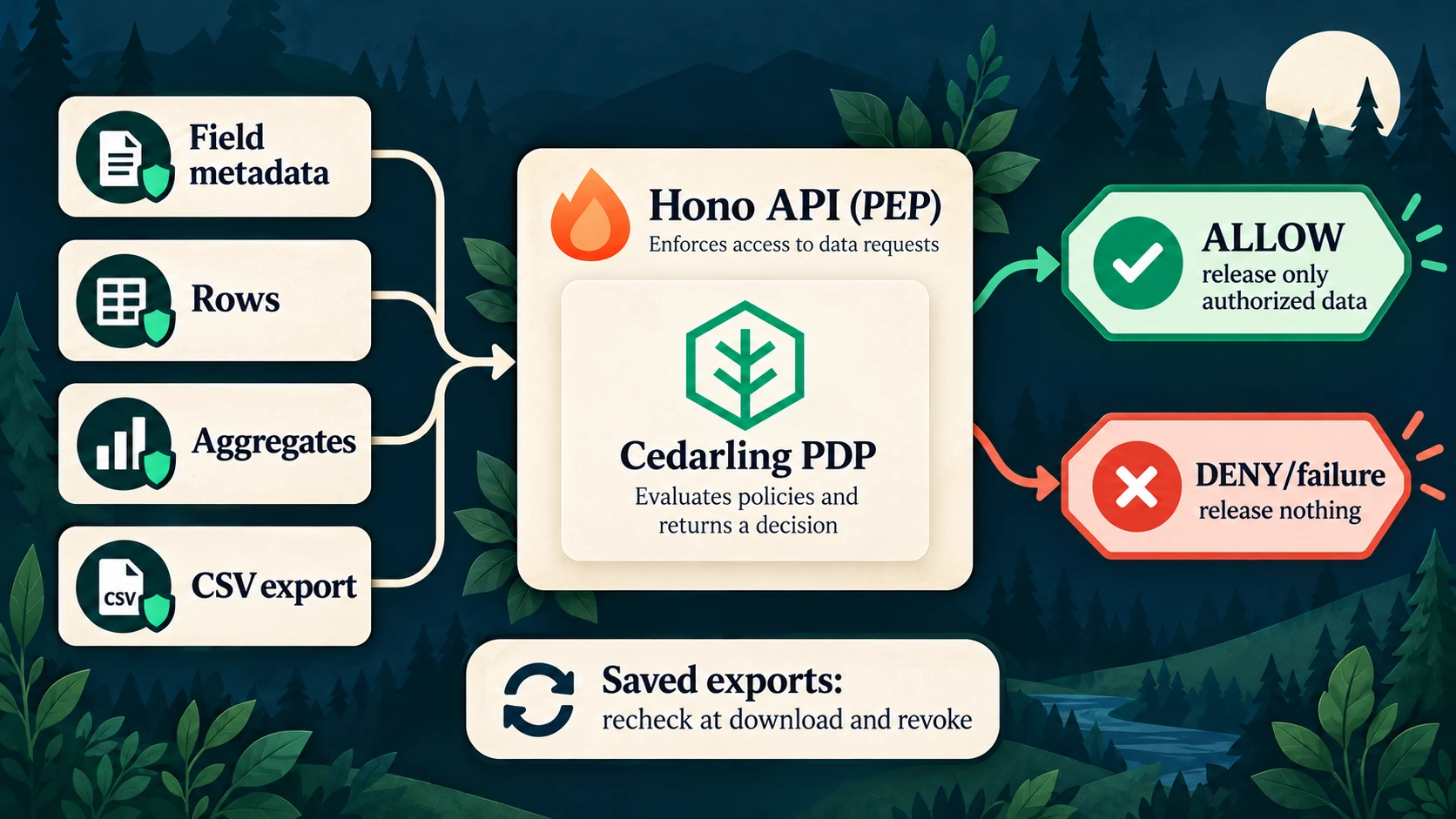
Authorization remains necessary when a generated export is downloaded later.
Opening a dashboard, seeing a field name, reading a row, releasing an aggregate, and downloading a derived file are different capabilities. Authorize each at the server boundary that controls its effect, using current trusted facts.
The same approach can protect a GraphQL API: authorize each sensitive field, row set, aggregate, or export at the resolver or service boundary that releases it, not merely at the query entry point. P5 itself uses Hono, not GraphQL; see GraphQL's authorization guidance (external site).
Follow src/server/authorization.ts, src/server/app.ts, src/server/query.ts,
src/server/export-service.ts, policy-store/, and the tests in the
completed P5 project (external site).
Production needs real identity, governed entitlements, secure storage/transport, and appropriate audit retention. Five records per group is one teaching constraint, not complete privacy protection against inference across repeated queries. Cedarling also does not replace parameterized SQL, transactions, expiry, or file cleanup.
For a production stack, consider Agama Lab Policy Designer for policy authoring, Jans Auth for token issuance, and Lock Server for centralized decision logs. See Cedarling production solutions.
Next, P6 moves to field-inspection workflows and authorization over submitted work rather than analytical projections.
Footnotes
-
An aggregate reports a calculation over multiple records, such as a count by department, without returning the individual rows. Small groups and repeated queries can still reveal sensitive facts, so P5 treats aggregate release as its own authorization boundary. ↩
-
Starting-checkpoint source:
src/server/app.ts(external site) runsdatabase.evaluate()and prints a permissive trace without authorization. ↩ -
Complete tagged store:
metadata.json(external site),schema.cedarschema(external site),fields.cedar(external site),plans.cedar(external site), andexports.cedar(external site). ↩ -
The pinned
cedarling_wasmJavaScript API (external site) accepts a JSON-string request. Serialization does not validate the query plan; the server must do that before calling Cedarling. ↩ -
Complete enforcement source:
src/server/authorization.ts(external site),src/server/app.ts(external site),src/server/query.ts(external site), andsrc/server/export-service.ts(external site). ↩ -
Completed
scripts/setup.ts(external site),scripts/dev.mjs(external site),package.json(external site), and repository-levelshared/policy-store.mjs(external site) show how the existing launcher receives the archive. ↩ -
Completed
Dockerfile(external site) copies the generated archive into the runtime image. ↩