




Protect a Node.js REST API with Cedarling
Secure a task manager with token-based server decisions and conservative browser controls.
On this page
Project source and prerequisites
- Complete P1 project (external site) and starting checkpoint (external site).
- Install Docker with Compose, or Node.js 24.21+ within 24.x and pnpm 10.17.1. The project supplies its own tutorial identity provider.
- Local HTTP and the bundled IdP are for learning only. Production requires HTTPS and a configured OIDC/OAuth issuer, such as Jans Auth (external site), Gluu, Auth0, or Okta.
- I prepared these steps on Ubuntu 24.04+. Native project checks also run in CI on macOS and Windows. If a platform-specific step fails, open an issue (external site).
- New to Cedarling? Read the short introduction when you need it.
- Keep the official Cedar policy syntax (external site) and Cedar schema syntax (external site) references handy for the policy-store steps.
Paths to application code below are relative to p1-task-manager/.
What are we going to secure?
Signing in tells a task manager who you are. It does not answer whether you may create work, edit another person's task, or read another organization's data. I'll show how to describe those decisions in Cedar policies and enforce them with Cedarling.
The application uses React, a Fastify Node.js API, and SQLite:
- Alex is a Tenant A contributor with assurance level 1. He works on assigned tasks.
- Mina is a Tenant A owner with assurance level 2. She manages her team's work.
- Sam is a Tenant B external user with assurance level 1. His work must stay separate from Tenant A.
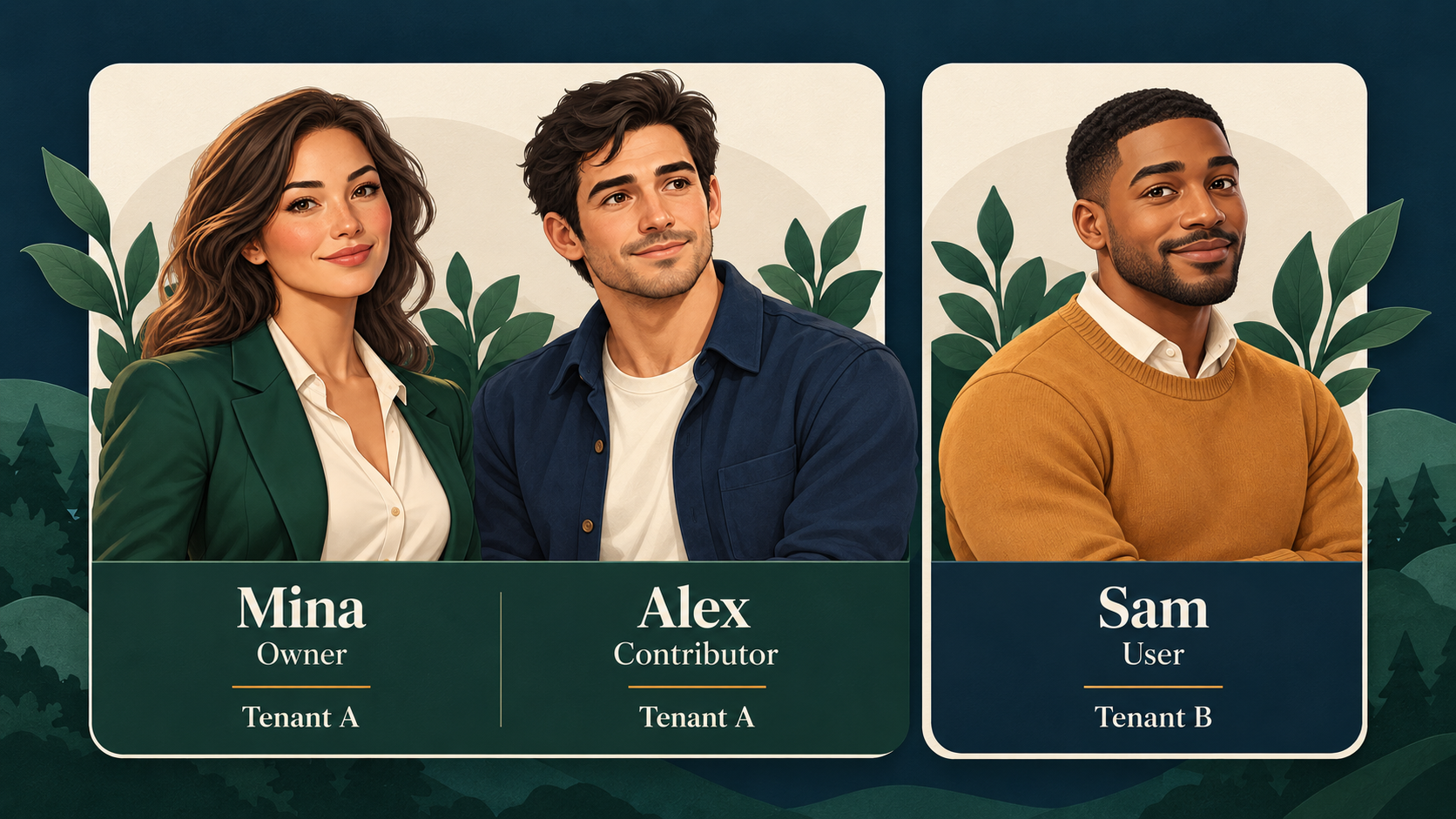
Meet the three users. A role or tenant label introduces a person; the current action and resource determine each authorization result.
Assurance is a database fact in this tutorial. Selecting Mina demonstrates the rule; it is not a real multi-factor authentication ceremony.
Our first problem: Alex can create a task even though creation belongs to an assured owner. We will stop that operation while preserving his ability to edit an assigned task.
Tutorial IdP -- signed access token --> Node.js session
                                             |
React -- request --> Fastify API (PEP) <-- current user/task -- SQLite
                            |
                   Cedarling instance (PDP) <-- policy store
                            |
                   ALLOW --> protected read/write
                   DENY  --> no protected effect

API -- safe facts + decision ceiling + policy archive --> React
                Cedarling browser PDP --> visible controls
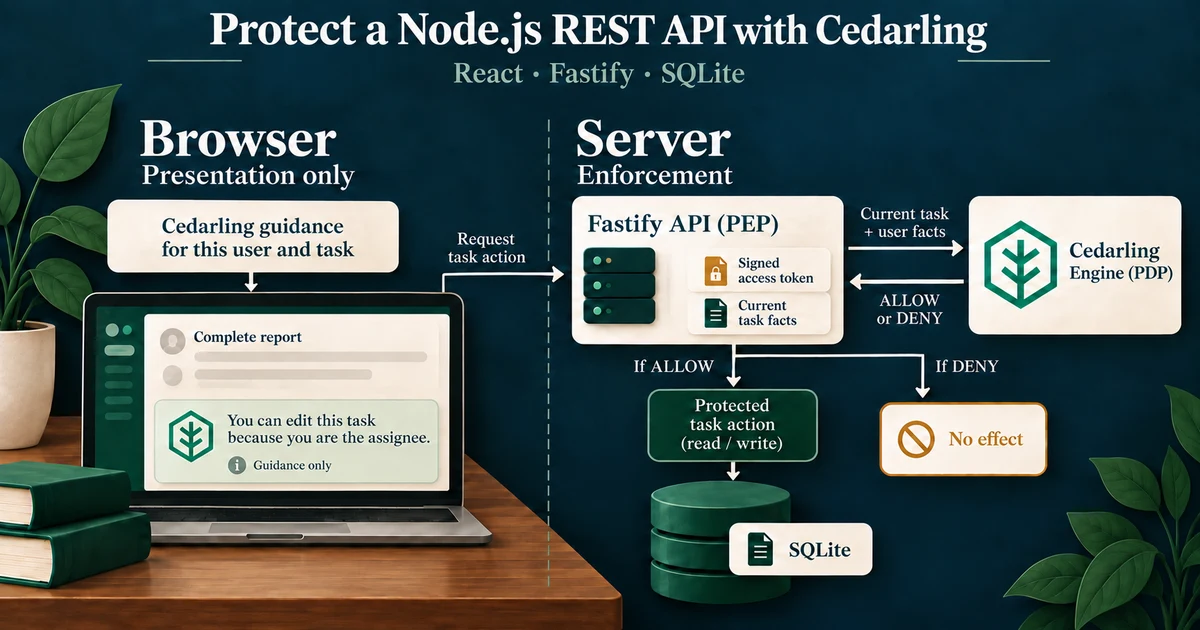
The PDP decides; the PEP enforces. Cedarling is the policy decision point. The API handlers enforce its decisions. The browser evaluates presentation rules, but the server decides again before releasing data or changing a task.
See what happens without authorization

The illustration shows the starting application's gap. The request in this section provides the actual baseline evidence.
Run the starting application
Use a separate checkout so the exercise does not change an existing database:
git clone https://github.com/GluuFederation/cedarling-tutorials.git cedarling-p1
cd cedarling-p1
git switch --detach 21b0832be4b31271320df992d04e9d97667d0e38
cd p1-task-manager
With Docker, start the application and its own identity provider:
docker compose up --buildAlternatively, use Node.js 24.21 or newer within 24.x and pnpm 10.17.1. At this starting commit, native startup uses two terminals. In the first:
pnpm --dir ../shared/identity-provider install --frozen-lockfile
pnpm --dir ../shared/identity-provider build
pnpm install --frozen-lockfile
pnpm run setup
node --env-file=.local/idp/.env ../shared/identity-provider/dist/main.js
In a second terminal, from the same project directory:
pnpm devOpen http://localhost:17001; the IdP runs at http://localhost:18001.
Use one startup method at a time. Sign in as Alex. The development IdP
usually prefills alex; enter it if the field is empty. Use any non-empty
password, such as cedarling-is-awesome, then approve access.
Show the missing authorization check
Open developer tools on the task manager page and run this in the console:
const session = await fetch("/api/session").then((r) => r.json());
const response = await fetch("/api/tasks", {
  method: "POST",
  headers: {
    "content-type": "application/json",
    "x-csrf-token": session.csrfToken,
  },
  body: JSON.stringify({
    title: "Unauthorized creation",
    description: "Must not be saved",
  }),
});
console.log(response.status, await response.json());
The application returns 201 and saves the task. Reload to see it. Authentication and CSRF protection worked: this really is Alex's session. The missing decision is whether Alex may create work.
Keep a capture of the response and saved task. Stop the application before
changing code. For Docker, use Ctrl+C, then docker compose down; this keeps
its data volume.
Prepare the existing application for authorization
No separate feature needs adding before Cedarling. The starting application already authenticates the session, checks CSRF and input, and uses task versions to reject stale writes. Locate the point where its Create route goes straight from those checks to a database write:1
// src/server/app.ts (starting checkpoint)
const task = database.createTask(
  session.user,
  parsed.data.title,
  parsed.data.description,
);
The route's capability metadata names task.create; it does not authorize the
write. The baseline's FAKE ALLOW list trace is diagnostic, not a decision for
Create. Make no source change yet: keep the existing safeguards, then add a
fresh Cedarling decision before each protected read or effect in the steps
below.
Who should be allowed to do what?
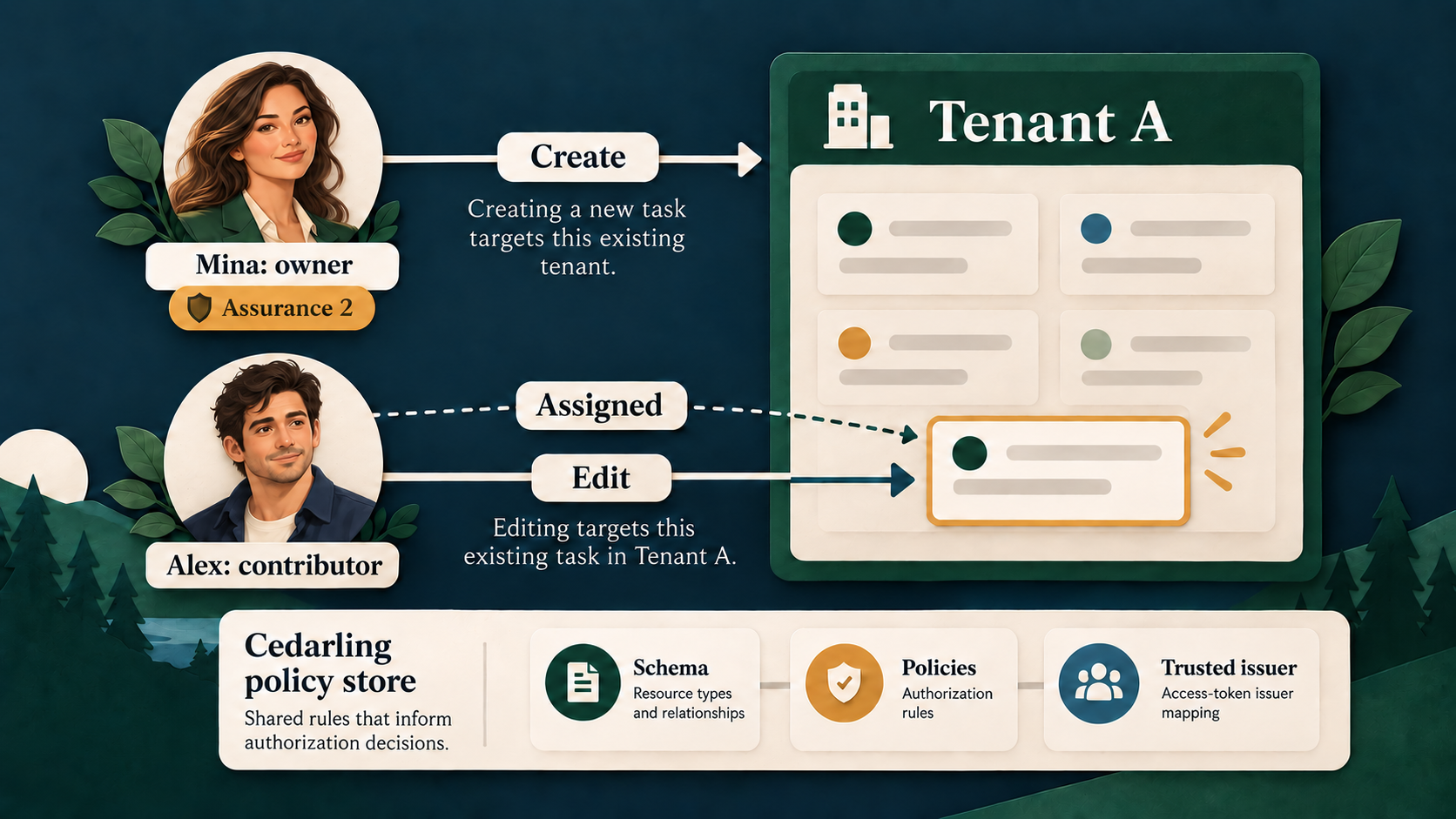
Create targets the existing tenant; Edit targets a current task.2 The policy store defines the vocabulary and rules used for both decisions.
Turn the business rules into capabilities
Every operation requires the user's current tenant to match the resource tenant. For existing tasks, “related” means the user owns the task or is its assignee.
| Capability | Action | Resource | Additional conditions |
|---|---|---|---|
task.view |
View |
Task | Related user |
task.create |
Create |
Tenant | Owner role, assurance at least 2 |
task.edit |
Edit |
Task | Related user |
task.assign |
Assign |
Task | Task owner, owner role, assurance at least 2, assignee in the same tenant |
task.complete |
Complete |
Task | Related user, owner role, assurance at least 2 |
task.delete |
Delete |
Task | Task owner, owner role, assurance at least 2 |
The complete action identifier is, for example, Task::Action::"Create".
Creation targets Task::Tenant: the tenant exists before the new task does.2
The rule combines the user's role with current tenant and task relationships.3
Design the policy store
Create the readable source using Cedarling's directory-based format (external site):
policy-store/
  metadata.json
  schema.cedarschema
  policies/
    server-access.cedar
    browser-shadow-access.cedar
  trusted-issuers/
    tutorial-idp.json
Create the five files shown above.4 The Create example below is complete; the linked policy files contain the other five actions and the browser rules.
metadata.json gives this store its stable ID, name, Cedar version, and policy
version 1.0.0. The version identifies a reviewed set of rules; the generated
archive's SHA-256 identifies its exact bytes. schema.cedarschema declares the
types of requests the policies may evaluate. The two policy files separate
server enforcement from browser guidance within the same store. Current facts
arrive in requests, so P1 needs no default entities, templates, or custom
issuers.5
| Design question | P1 answer |
|---|---|
| Where does identity come from? | Server-held signed access token; server-projected user in the browser |
| Which token mapping is trusted? | P1TaskManager::Access_token from P1's IdP |
| Who is the browser principal? | Task::User: ID, tenant, role, assurance |
| Which task relationships matter? | Task::Task: tenant_id, owner_id, optional assignee_id |
| What contains a new task? | Task::Tenant: tenant_id |
| Which request facts change? | Boundary, current user, proposed assignee's current tenant |
| What else must the schema describe? | Access-token attributes/tags, trusted-issuer URL, generated token context, six actions |
Server multi-issuer requests supply tokens rather than a principal entity.
Task::Any is an empty schema type satisfying Cedar's action principal
declaration. It is not another user record or an authorization role. Browser
requests use Task::User. In the Task namespace, Task carries the current
task's tenant, owner, and optional assignee; Tenant is the existing Create
target. RequestContext declares the boundary, current user, optional
proposed-assignee tenant, and Cedarling token context. The six action
declarations pair each business operation with its valid resource type. For
example, the schema makes Create a decision about a Tenant:
// policy-store/schema.cedarschema
action "Create" appliesTo {
  principal: [Any, User],
  resource: [Tenant],
  context: RequestContext
};
The P1TaskManager namespace describes the trusted issuer and access-token
entity that Cedarling builds from signed JWT evidence. The policy can then
read the token's validated claims in context.tokens.
Configure trusted-issuers/tutorial-idp.json:
{
  "name": "P1TaskManager",
  "description": "Shared Cedarling tutorial identity provider",
  "openid_configuration_endpoint": "http://localhost:18001/.well-known/openid-configuration",
  "token_metadata": {
    "access_token": {
      "trusted": true,
      "entity_type_name": "P1TaskManager::Access_token",
      "token_id": "jti",
      "required_claims": ["iss", "sub", "aud", "jti", "exp", "scope"]
    }
  }
}
This file names the IdP discovery endpoint, marks the access token trusted,
maps it to P1TaskManager::Access_token, and requires the listed claims. OIDC
already validates the ID token during authentication. Authorization uses
the access token intended for http://localhost:17001/api. Each server policy
binds its sub to the current database user and requires the action's OAuth
scope. Requesting scopes during login does not itself grant a business operation.
Write the Create rule
In policies/server-access.cedar, the complete Create policy is:
// policy-store/policies/server-access.cedar
@id("server-owner-create-task")
permit(
  principal,
  action == Task::Action::"Create",
  resource is Task::Tenant
) when {
  context.boundary == "server" &&
  context has user &&
  context has tokens &&
  context.tokens has p1taskmanager_access_token &&
  context.tokens.p1taskmanager_access_token.hasTag("sub") &&
  context.tokens.p1taskmanager_access_token.getTag("sub").contains(context.user.subject) &&
  context.tokens.p1taskmanager_access_token.hasTag("aud") &&
  context.tokens.p1taskmanager_access_token.getTag("aud").contains("http://localhost:17001/api") &&
  context.tokens.p1taskmanager_access_token has scope &&
  (context.tokens.p1taskmanager_access_token.scope == "task.create" ||
    context.tokens.p1taskmanager_access_token.scope like "task.create *" ||
    context.tokens.p1taskmanager_access_token.scope like "* task.create" ||
    context.tokens.p1taskmanager_access_token.scope like "* task.create *") &&
  context.user.tenant_id == resource.tenant_id &&
  context.user.role == "owner" &&
  context.user.assurance_level >= 2
};
p1taskmanager_access_token is Cedarling's generated token-context key, not
another namespace. Dynamic sub and aud claims are accessed as tags. Scope
is a space-separated list of permissions. This rule accepts task.create as
one complete entry—whether it is alone, first, middle, or last—and does not
mistake task.create.extra for the same permission.
policies/server-access.cedar contains one permit per protected API action.
All six bind the signed token subject and API audience to trusted server facts,
require that action's exact scope, and require a tenant match. Their remaining
conditions follow the capability table: View and Edit allow the owner or
assignee; Assign requires the assured owner and a same-tenant assignee;
Complete requires an assured related owner; Delete requires the assured task
owner. Each rule has a distinct @id so its contribution is visible in logs.
How the browser policy file differs
policies/browser-shadow-access.cedar has the same six actions and resource
types, but its rules use context.boundary == "browser" and the safe
Task::User principal projected by the server. They check tenant, role,
assurance, and task relationships without reading JWTs. For example,
browser-owner-create-task shows Create only to an assured owner in the
selected tenant. The server-provided decision ceiling and a fresh server
decision still control every protected API effect.
No matching permit means DENY. See the Cedar policy syntax (external site).
Design the requests and their enforcement points
Each server request uses the authenticated session token and freshly loaded database facts. The route selects the action; the browser cannot supply trusted role, owner, or tenant values.
| Boundary | Resource and context | Protected effect |
|---|---|---|
| List / detail | Current task and user | Return only allowed task data |
| Create | Current user's tenant and user | Insert with server-selected owner and tenant |
| Edit | Current task and user | Update fields at the expected version |
| Assign | Task/user plus proposed assignee's database tenant | Change assignee at the expected version |
| Complete | Current task and user | Complete at the expected version |
| Delete | Current task and user | Delete at the expected version |
| Browser controls | Projected user, versioned task/tenant, browser boundary | Show controls within the server ceiling |
Denied task operations return the same 404 as an absent task. Denied creation returns 403. Unavailable required authorization returns 503, not ALLOW. CSRF, input validation, session refresh, and stale-write 409 checks stay in the application.
Enforce the rules with Cedarling
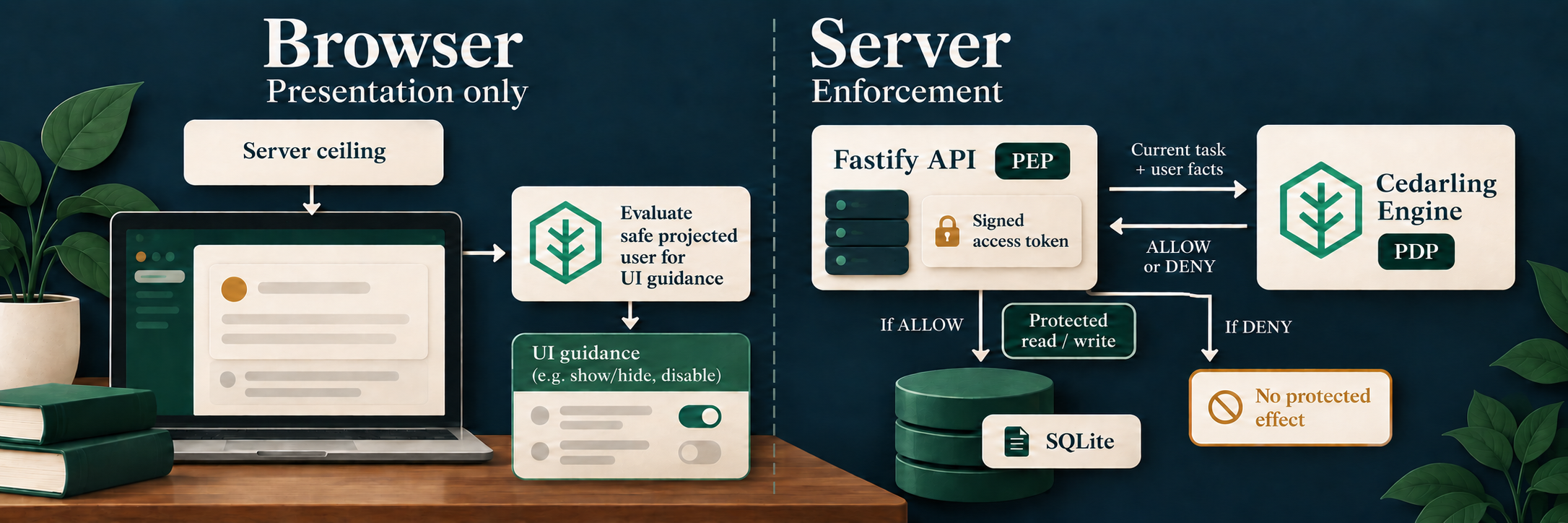
Browser guidance shapes the interface. The API keeps the signed token and current facts, asks Cedarling, and gates the protected effect.
Install and package the store
From p1-task-manager/:
pnpm add --save-exact @janssenproject/cedarling_wasm@0.0.468 fflate@0.8.3
pnpm add --save-dev --save-exact @cedar-policy/cedar-wasm@4.12.0
The Cedar package checks source syntax; the Cedarling SDK makes application decisions. The examples follow the pinned SDK README (external site).
Add the integration's repository-level shared/policy-store.mjs builder and
shared/policy-store.d.mts declaration.6 These are not in the starting commit.
The builder validates source paths, JSON, schema/policy syntax, and policy IDs,
then creates the ignored ZIP-format .local/policy-store.cjar:
node ../shared/policy-store.mjsKeep policy-store/ readable in Git. Rebuild and restart after policy edits.
Initialize once on the server
In src/server/authorization-trace.ts, initialize Cedarling from the archive.
This excerpt omits the surrounding artifact registration; the completed
function resolves the archive relative to options.projectRoot:
// src/server/authorization-trace.ts
import { readFile } from "node:fs/promises";
import path from "node:path";
import { initFromArchiveBytes } from "@janssenproject/cedarling_wasm";

const archiveName = "policy-store.cjar";
const archive = new Uint8Array(
  await readFile(path.join(options.projectRoot, ".local", archiveName)),
);
const cedarling = await initFromArchiveBytes(
  {
    CEDARLING_APPLICATION_NAME: "P1 Task Manager server",
    CEDARLING_LOG_TYPE: "memory",
    CEDARLING_LOG_TTL: 300,
    CEDARLING_JWT_SIG_VALIDATION: "enabled",
    CEDARLING_JWT_SIGNATURE_ALGORITHMS_SUPPORTED: ["RS256"],
    CEDARLING_STRICT_SCHEMA_VALIDATION: "enabled",
    CEDARLING_TRUSTED_ISSUER_LOADER_TYPE: "SYNC",
  },
  archive,
);
The IdP must run first. Require loadedTrustedIssuersCount() to be at least one before serving requests. src/server/main.ts owns this instance, passes the authorization functions to buildApp(), and calls shutDown() on application closure. Strict schema validation makes an invalid loaded model a startup error.7
Ask Cedarling for a signed decision before the write
Inside the server authorization function, session is trusted server state.
The following expanded Create request illustrates the shape produced by
tokenSet(session) and requestItem(session, target) in the completed file:
// src/server/authorization-trace.ts
const result = await cedarling.authorizeMultiIssuer(
  JSON.stringify({
    tokens: [
      {
        mapping: "P1TaskManager::Access_token",
        payload: session.tokens.accessToken,
      },
    ],
    action: 'Task::Action::"Create"',
    resource: {
      cedar_entity_mapping: {
        entity_type: "Task::Tenant",
        id: session.user.tenantId,
      },
      tenant_id: session.user.tenantId,
    },
    context: {
      boundary: "server",
      user: {
        id: session.user.id,
        subject: session.user.subject,
        tenant_id: session.user.tenantId,
        role: session.user.role,
        assurance_level: session.user.assuranceLevel,
      },
    },
  }),
);
for (const log of cedarling.getLogsByRequestId(result.request_id)) {
  console.info(JSON.stringify(log, null, 2));
}
if (result.response.diagnostics.errors.length > 0) {
  throw new Error("Cedarling returned policy evaluation errors");
}
return result.decision;
authorizeMultiIssuer() takes a JSON string, so JSON.stringify() serializes
the request object into the format this Cedarling JavaScript method expects.8
The JSON.stringify(log, null, 2) call is different: it prints nested decision
evidence legibly in this local lab. In production, send reviewed, access-
controlled decision logs to centralized audit storage such as Jans Lock Server
instead of relying on a console.
The module also emits authorization.context, linking the Fastify request ID,
actor, capability, and Cedarling request ID. Native Cedarling records remain
unchanged. Unexpected errors produce one bounded authorization.failed record;
arbitrary exception messages and raw tokens are not printed.
In src/server/app.ts, run this after authentication and validation, but before database.createTask(). The route helper maps false to 403 and an exception to 503. Existing-task routes reload their resource and use their own action before reading or mutating it. Replace permissive traces rather than leaving unguarded effects alongside Cedarling calls.
For lists and control previews, call authorizeMultiIssuerBatch() with shared
tokens and an items array of action/resource/context requests. Check
item.is_ok before item.unwrap() and reject diagnostic errors. A successful
item with decision: false is a valid denial, not a runtime error. Associate
results with submitted items in order and return only allowed list rows.
Add browser guidance without transferring authority
Return an authorization envelope beside task data: safe user projection, server decision ceiling, policy ID/version/SHA-256/archive URL, subject epoch, resource versions, evaluation time, and expiry. Serve the exact archive at /policy-store/<sha256>.cjar. OAuth tokens and session IDs stay on the server.
In src/web/authorization-trace.ts, fetch that same-origin archive and verify
its digest before initialization:
// src/web/authorization-trace.ts
const cedarling = await initFromArchiveBytes(
  {
    CEDARLING_APPLICATION_NAME: "P1 Task Manager browser",
    CEDARLING_LOG_TYPE: "memory",
    CEDARLING_LOG_TTL: 300,
    CEDARLING_JWT_SIG_VALIDATION: "disabled",
    CEDARLING_JWT_STATUS_VALIDATION: "disabled",
    CEDARLING_STRICT_SCHEMA_VALIDATION: "enabled",
  },
  bytes,
);
Both JWT checks are disabled only in this unsigned browser instance. It receives no JWTs and needs no IdP discovery; the server's validation remains enabled.
Build principal as Task::User from envelope.uiPrincipal. Each item uses the
shared action mapping, the projected resource, and
context: { boundary: "browser" }. Assignment also supplies the projected
assignee tenant. Evaluate them together:
// src/web/authorization-trace.ts
const batch = await cedarling.authorizeUnsignedBatch(
  JSON.stringify({ principal, items }),
);
Check item success and diagnostics. A control is enabled only when server
ceiling AND browser decision allow it. App.tsx consumes these results, not a
parallel role-to-permission table.
An expired envelope, changed subject, or mismatched version clears controls and causes a refresh. When browser evaluation fails with a current envelope, retain the server ceiling and warn. This is not a fabricated DENY; every attempted effect still requires a fresh server decision.
The shared action names and envelope types belong in
src/shared/authorization.ts; move their callers from the baseline's
src/server/capabilities.ts and remove that old file. Connect the browser
authorization function to the API client, response types, and React controls
without adding another permission table.9
Finish the runnable integration
The decisions now guard the task manager. Complete its startup paths so each
one builds and loads the same policy archive: call the shared builder during
scripts/setup.mjs and before the application build, then include the archive
in the Docker image.10 The build script in package.json is:
{
  "scripts": {
    "build": "node ../shared/policy-store.mjs && vite build && tsc -p tsconfig.server.json"
  }
}
Keep the configured issuer and API audience aligned with the policy store.
The completed scripts/dev.mjs prepares the project and starts its IdP,
browser watcher, and API together. With dependencies installed, run pnpm dev;
Docker still uses docker compose up --build. The baseline's two-terminal
instructions no longer apply to this completed development script.
Verify that the right operations succeed
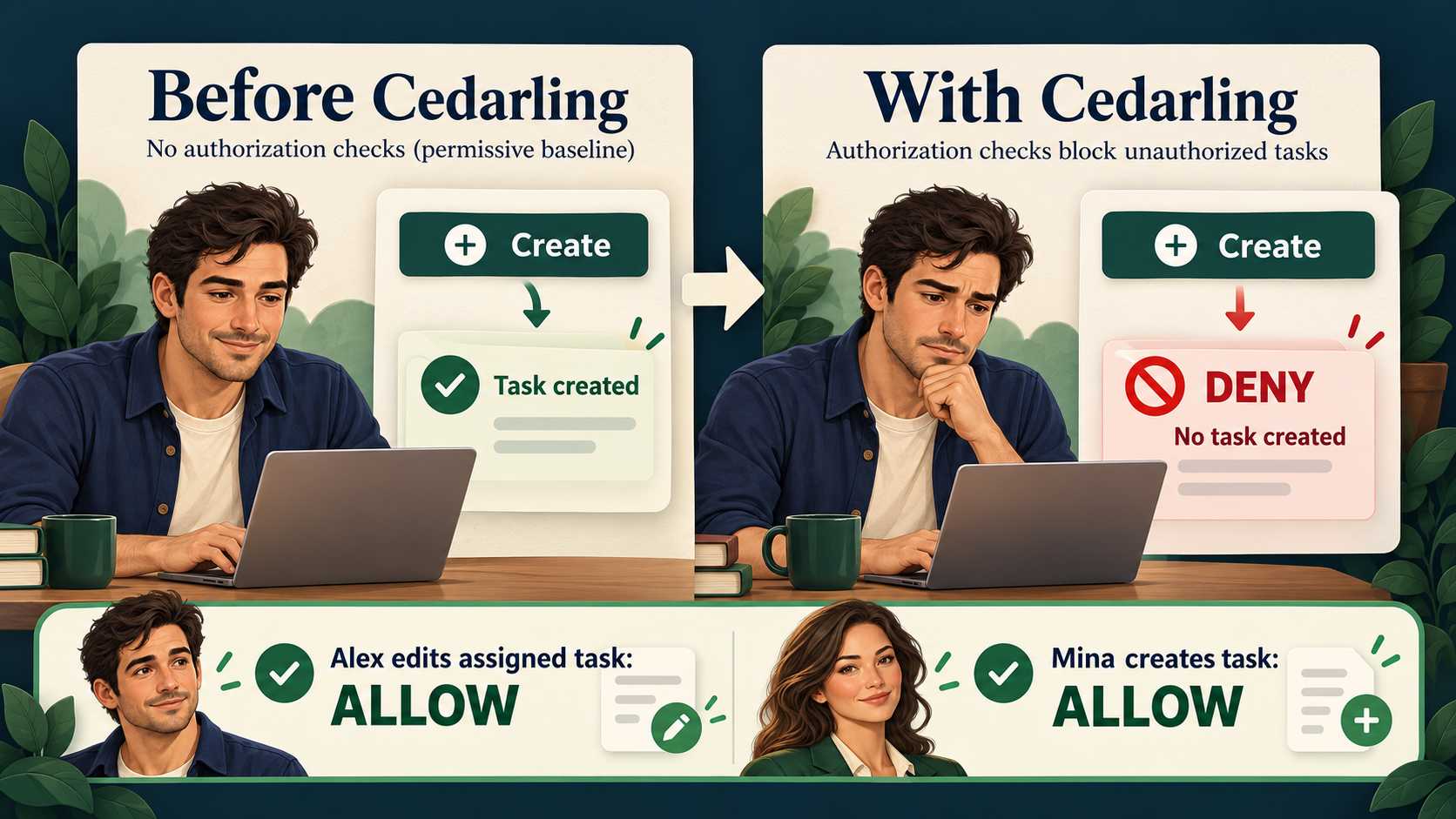
These are the expected outcomes. Repeat the requests and inspect the real responses and Cedarling logs below to prove them.
Repeat the original request and a legitimate operation
Use fresh exercise data for the integrated run. Sign in as Alex and repeat the
same console request used before integration. It returns 403 with
{"error":"forbidden"}; reloading shows no new task. A hidden Create button alone
would not prove this: the direct request bypasses the interface.
Open Prepare launch brief, edit its title, and select Save changes. It succeeds because Alex is assigned this Tenant A task. Authorization must preserve legitimate work.
On the original seed data, check the complete matrix:
| Operation | Alex, Tenant A | Mina, Tenant A | Sam, Tenant B |
|---|---|---|---|
| View | ALLOW assigned brief; DENY unassigned review | ALLOW owned A tasks | ALLOW own B task; DENY A tasks |
| Create | DENY | ALLOW in A | DENY |
| Edit | ALLOW assigned brief | ALLOW owned A tasks | ALLOW own B task; DENY A tasks |
| Assign | DENY | ALLOW owned task to A user; DENY B assignee | DENY |
| Complete | DENY | ALLOW related A task | DENY |
| Delete | DENY | ALLOW owned A task | DENY |
Sign in separately as each person. State changes affect later observations: deleting a task makes it absent, while submitting an old version causes 409. Test domain conditions separately from policy denials.
Explain the decision evidence
Server logs use formatted JSON so nested reasons are visible. The small
application record's cedarlingRequestId matches a native request_id. One HTTP
request can produce several decisions, each with its own Cedarling ID.
The denied Alex creation contains these native fields:
{
  "log_kind": "Decision",
  "action": "Task::Action::\"Create\"",
  "resource": "Task::Tenant::\"tenant-a\"",
  "decision": "DENY",
  "principal": [],
  "diagnostics": { "reason": [], "errors": [] }
}
This is a selected-field excerpt, not a replacement log format. IDs and timestamps
vary. principal: [] is expected for this multi-issuer request: token evidence
represents identity. This DENY has no determining policy: no permit matched and
no forbid applied. The empty reason does not identify which condition failed.11
Compare the Create rule with trusted facts to explain Alex's missing owner role
and assurance.
For the legitimate edit, expand diagnostics.reason and find the
server-edit-related-task policy annotation. Policy-store ID/version identify
the rules; startup SHA-256 identifies their archive bytes. batch_id groups
decisions evaluated together.
Browser logs show a label such as
P1 browser | ALLOW | Task::Action::"Edit" and an expandable native object.
They prove browser evaluation, not server permission. A fallback warning means
the UI used the current server ceiling instead.
Record only synthetic evidence. Do not publish tokens, cookies, CSRF values, or session objects. Native logs contain identifiers, so review captures before use.
Prove stale and unavailable decisions stay safe
Stop P1 services to free ports 17001 and 18001, then run:
pnpm exec playwright install chromium
pnpm check
On Linux, missing browser libraries may require
pnpm exec playwright install --with-deps chromium. The check includes formatting,
lint, types, unit tests, build, and real browser/IdP verification with disposable data.
test/policy-store.test.tsevaluates actual Cedarling rules, including token, scope, tenant, and relationship failures. It checks readable, correlated logs without token payloads.test/app.test.tsinjects unavailable authorization and proves 503 responses preserve protected state.test/browser-authorization.test.tschecks stale envelopes and the current-server-ceiling fallback.e2e/task-authorization.e2e.tsuses the real IdP and browser Cedarling instance, then repeats the unauthorized direct Create request.12
A runtime failure is not a policy denial. Keep its separate error event and fail closed on the server. Stopping only the IdP is not a reliable PDP-failure simulation: signing keys and valid tokens may already be cached.
Apply the pattern to your own application
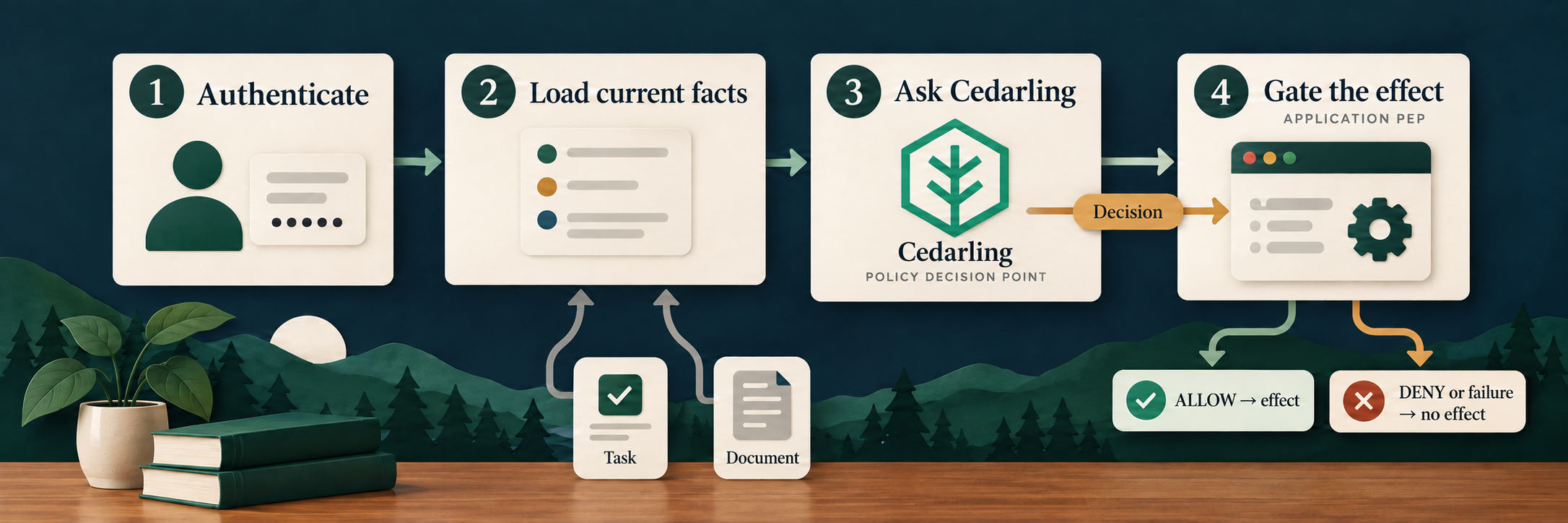
Use the same sequence around any effect your application must protect.
Reuse this sequence: authenticate, load current facts, select a fixed business action, ask Cedarling, then gate the effect. Browser decisions improve the experience without becoming the authority over server data.
Follow policy-store/, the two authorization-trace.ts files, and the tests
in the completed P1 project (external site)
to trace each rule to a protected effect.
Production needs real authentication and assurance, HTTPS, protected secrets, reviewed policy distribution, and appropriate log access/retention. This local development IdP and console output are not a production identity or audit system.
For a production stack, consider Agama Lab Policy Designer for policy authoring, Jans Auth for token issuance, and Lock Server for centralized decision logs. See Cedarling production solutions.
Next, P2 applies the same approach to retrieval: authorize the corpus and candidate documents before loading protected text or sending it to an AI model.
Footnotes
-
Starting-checkpoint source:
src/server/app.ts(external site) contains the direct Create write;src/server/authorization-trace.ts(external site) contains the fake list trace. ↩ -
Cedar recommends authorizing creation against an existing resource container because the new resource does not yet exist. Here, the tenant is that container. See Cedar's resource-container guidance (external site). ↩ ↩2
-
RBAC names role-based access control; ReBAC names relationship-based access control. P1's concrete rule also checks tenant and assurance attributes, so neither label alone describes its decision. ↩
-
Complete tagged policy-store source:
metadata.json(external site),schema.cedarschema(external site),tutorial-idp.json(external site),server-access.cedar(external site), andbrowser-shadow-access.cedar(external site). ↩ -
Default entities (external site) are shared across requests. P1 loads its changing users and tasks for each decision; it has no reusable policy slots or non-JWT issuer to configure. ↩
-
Add the repository-level
shared/policy-store.mjs(external site) andshared/policy-store.d.mts(external site), one level abovep1-task-manager/. ↩ -
Complete server integration:
src/server/authorization-trace.ts(external site),src/server/app.ts(external site), andsrc/server/main.ts(external site). ↩ -
The pinned
cedarling_wasmJavaScript API (external site) accepts a JSON-string request for token-based and unsigned authorization. Serialization does not make browser-supplied facts trustworthy. ↩ -
Complete shared and browser integration:
src/shared/authorization.ts(external site),src/web/authorization-trace.ts(external site),src/web/api.ts(external site),src/web/types.ts(external site), andsrc/web/App.tsx(external site). ↩ -
Completed startup and packaging files:
scripts/setup.mjs(external site),package.json(external site),Dockerfile(external site),src/server/config.ts(external site),scripts/dev.mjs(external site), andshared/dev-supervisor.mjs(external site). ↩ -
Cedar returns an empty list of determining policies when no policy permits or forbids the request. A matched
forbidwould instead appear as a determining policy. See How Cedar authorization works (external site). ↩ -
Full verification examples:
test/policy-store.test.ts(external site),test/app.test.ts(external site),test/browser-authorization.test.ts(external site), ande2e/task-authorization.e2e.ts(external site). ↩